



Fiverr vs Freelancer.com: Honest Comparison for Beginners [2026 Guide]
Here’s a stat that might surprise you: over 70% of new freelancers quit within their first six months — and one of the biggest reasons is that they chose the wrong platform to start on. Ouch.
If you’ve been going back and forth on the Fiverr vs Freelancer debate, you’re definitely not alone. Both platforms promise the dream of earning money online, working from anywhere, and being your own boss. But they work in fundamentally different ways — and picking the wrong one can mean months of frustration with zero income to show for it.
I’ve been freelancing online since 2019, and I’ve earned on both platforms. In this guide, I’m going to break down everything you need to know about Fiverr and Freelancer.com — the fees, the earning potential, the learning curve, and which one is genuinely better depending on your specific situation.
By the end of this article, you’ll know exactly which platform to join, how to set yourself up for success, and how to land your first paying client. Let’s dive in.
Fiverr vs Freelancer: Understanding the Core Difference
Before we get into the nitty-gritty comparison, let’s clear up something that trips up almost every beginner: Fiverr and Freelancer.com are built on completely different models. Understanding this distinction is the single most important thing you can take from this article.
How Fiverr Works: The “Gig” Marketplace
Fiverr operates like an online store where you are the product. You create listings called “gigs” — for example, “I will design a professional logo for $50” — and buyers come to you. Think of it like setting up a shop on Etsy, but instead of selling handmade candles, you’re selling your skills and services.
This model is incredibly powerful for beginners because:
- You don’t have to chase clients — they find you through Fiverr’s search engine
- You set your own prices from the start
- You can create multiple gigs across different skills
- The platform handles payments, disputes, and contracts
Imagine waking up on a Tuesday morning, checking your phone, and seeing a notification: “You have a new order — $150.” That’s the Fiverr experience at its best. You didn’t send a single proposal. The buyer found your gig, liked what they saw, and placed an order while you were sleeping.
Want to see what I mean? You can browse top Fiverr gigs to get a sense of how sellers structure their offerings.
How Freelancer.com Works: The “Bidding” Marketplace
Freelancer.com operates on a traditional bidding model. Clients post projects, and freelancers submit proposals (bids) to win the work. It’s more like a job board where you’re actively competing against other freelancers for every single project.
Here’s how it typically goes:
- A client posts a project: “Need a WordPress website — budget $500”
- Dozens (sometimes hundreds) of freelancers submit bids
- The client reviews bids and selects a freelancer
- Work begins and payment is released upon completion
This model can work well for experienced freelancers who are great at writing proposals. But for beginners? It can feel like shouting into a void.
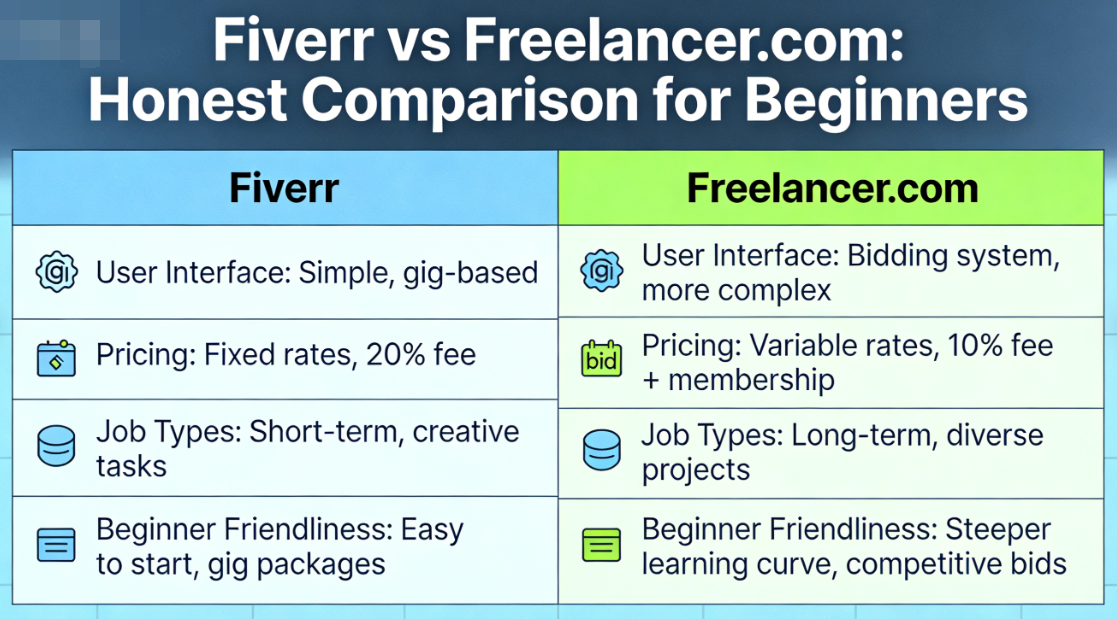
Head-to-Head Comparison: Fiverr vs Freelancer.com
Let’s put these two platforms side by side and compare what actually matters when you’re trying to earn freelance income online. I’ve organized this into the categories that beginners care about most.
| Feature | Fiverr | Freelancer.com |
|---|---|---|
| Business Model | Gig-based (sellers create listings) | Bid-based (sellers apply to projects) |
| Seller Fees | 20% of each transaction | 10% or $5 (whichever is greater) |
| Free to Join | Yes | Yes (limited bids on free plan) |
| Monthly Membership Required | No | Optional, but practically necessary ($15–$60/mo) |
| Ease of Getting Started | ⭐⭐⭐⭐⭐ (Very Easy) | ⭐⭐⭐ (Moderate) |
| Time to First Sale | 1–4 weeks (typical) | 2–8 weeks (typical) |
| Competition Level | High, but searchable | Very high per project |
| Payment Protection | Strong (funds held in escrow) | Good (milestone-based escrow) |
| Average Beginner Earnings (first 3 months) | $200–$800/month | $100–$500/month |
| Best For | Creative services, digital skills, beginners | Technical projects, larger contracts, experienced freelancers |
Key Takeaway: While Freelancer.com charges lower commission (10% vs. Fiverr’s 20%), the hidden costs of premium memberships and the time spent writing proposals can actually make Fiverr more cost-effective — especially for beginners who need to start earning quickly.
Fees and Costs: Where Your Money Actually Goes
Let’s talk about money — because this is where things get real. One of the biggest factors in the Fiverr vs Freelancer comparison is what each platform takes from your hard-earned cash.
Fiverr’s Fee Structure
Fiverr keeps it simple: they take 20% of every order. If you complete a $100 gig, you receive $80. No monthly fees, no hidden charges, no tiered pricing to figure out.
Is 20% a lot? Honestly, yes — it’s one of the higher commission rates in the freelancing world. But here’s the thing many beginners don’t consider: Fiverr is doing the marketing for you. They spend millions on advertising, SEO, and bringing buyers to the platform. That 20% is essentially your marketing budget — and for someone just starting out with zero clients and zero reputation, that’s a pretty fair trade.
Here’s what your earnings look like on Fiverr at different price points:
- $5 gig → You keep $4
- $50 gig → You keep $40
- $200 gig → You keep $160
- $1,000 gig → You keep $800
Pro tip: Don’t start at $5. Seriously. One of the best Fiverr tips I can give you is to price your gigs at $25 or higher from day one. Low prices attract nightmare clients, and you’ll burn out fast.
Freelancer.com’s Fee Structure
Freelancer.com charges 10% on fixed-price projects or 10% on hourly projects, with a minimum fee of $5. On the surface, that sounds way better than Fiverr’s 20%.
But here’s the catch: you only get 8 free bids per month on the basic (free) plan. Eight. In a marketplace where you might need to submit 30-50 bids to land a single project, that’s wildly insufficient.
To get more bids and visibility, you’ll need a paid membership:
- Basic Plan: Free (8 bids/month)
- Plus Plan: $15.99/month (100 bids/month)
- Professional Plan: $29.99/month (300 bids/month)
- Premier Plan: $59.99/month (1,500 bids/month)
So while the commission is lower, you might be spending $16–$60 per month before you’ve earned a single dollar. For a beginner still figuring things out, that’s a risky investment.
Ease of Getting Started: Which Platform Is More Beginner-Friendly?
This is where the Fiverr vs Freelancer comparison gets really interesting — and where Fiverr genuinely shines for newcomers.
Getting Started on Fiverr
Setting up on Fiverr is remarkably straightforward. Here’s what you need to do:
- Create your free account — takes about 5 minutes
- Complete your profile — add a professional photo, write a compelling bio, list your skills
- Create your first gig — write a title, description, set your pricing and delivery time
- Add gig images or a video — this is crucial for standing out
- Publish and optimize — your gig goes live and can start appearing in search results
The whole process can be done in a single afternoon. And once your gig is live, it works for you 24/7 — even while you sleep. I’ve had orders come in at 3 AM on a Sunday. That’s the beauty of Fiverr gigs — they’re passive until someone places an order.
If you’re ready to get started, you can create your free Fiverr account and have your first gig live today. For a detailed walkthrough, check out our complete Fiverr guide.
Getting Started on Freelancer.com
Freelancer.com’s setup process is also relatively simple, but the real work begins after you’ve created your account. Unlike Fiverr, you can’t just set up a listing and wait. You need to:
- Create your profile and portfolio
- Browse available projects in your category
- Write a customized proposal for each project you want
- Wait for the client to review your bid (among dozens of others)
- Possibly negotiate terms if you’re shortlisted
- Finally begin work once selected
The bidding process is time-consuming, and rejection is the norm — especially when you’re new and have no reviews. Many beginners report submitting 20-30 bids before landing their first project. That’s a lot of unpaid work before you see a dime.
? Ready to Start Earning as a Freelancer?
If you’re a beginner looking for the fastest path to your first online dollar, Fiverr’s gig-based model is hard to beat. You don’t need to write proposals, chase clients, or pay for a membership. Just create a compelling gig and let buyers come to you.
Sign up for Fiverr here — it’s 100% free, and you could have your first gig live within the hour.
Earning Potential: Where Can You Make More Money?
Alright, let’s talk about the big question everyone really wants answered: which platform will put more money in your pocket?
Fiverr Earning Potential
There’s a persistent myth that Fiverr is only for cheap $5 gigs. That hasn’t been true for years. In 2026, top sellers on Fiverr are earning $5,000 to $20,000+ per month. Even mid-level sellers regularly pull in $1,000–$3,000 monthly.
Here’s a realistic earnings timeline for a dedicated beginner on Fiverr:
- Month 1: $0–$100 (getting your first reviews)
- Month 2–3: $100–$500 (momentum builds as reviews accumulate)
- Month 4–6: $300–$1,500 (Fiverr’s algorithm starts favoring your gig)
- Month 7–12: $500–$3,000+ (repeat clients, higher prices, Level Seller badges)
The key to Fiverr for beginners is understanding that your first few weeks will be slow. But once you get 10-15 five-star reviews, things start to snowball. The Fiverr algorithm rewards sellers who deliver quality work on time, and your gig starts ranking higher in search results.
Some of the highest-earning categories on Fiverr include:
- Video editing and animation — $100–$2,000 per gig
- Web development — $200–$5,000 per gig
- Copywriting and SEO content — $50–$500 per gig
- Logo and brand design — $50–$1,000 per gig
- AI and automation services — $100–$3,000 per gig
- Voice-over work — $25–$500 per gig
Freelancer.com Earning Potential
Freelancer.com tends to attract larger, more complex projects — which means the per-project earnings can be higher. It’s not unusual to see projects posted with budgets of $1,000–$10,000+.
However, there’s a major caveat: winning those projects is extremely competitive. You’re often bidding against freelancers from countries with lower costs of living who can afford to charge significantly less. A web development project with a $2,000 budget might attract bids ranging from $200 to $5,000.
The realistic earning timeline on Freelancer.com for a beginner looks more like this:
- Month 1–2: $0–$50 (still trying to win first project)
- Month 3–4: $100–$400 (landed first 1-2 projects)
- Month 5–8: $300–$1,000 (building a track record)
- Month 9–12: $500–$2,500+ (clients start coming back)
The gap between Fiverr and Freelancer.com earnings narrows over time for skilled professionals. But for that crucial first 3–6 months? Fiverr gets you earning faster.
Pros and Cons: The Honest Truth About Each Platform
Let me give you the no-BS breakdown. Every platform has strengths and weaknesses, and I want to be totally transparent about both.
Fiverr: Pros and Cons
✅ Pros:
- No upfront costs — completely free to join and create gigs
- Passive client acquisition — buyers find you through search
- No proposal writing — saves hours every week
- Excellent mobile app — manage your business from anywhere
- Seller levels system — rewards consistency and quality
- Massive buyer base — millions of active buyers worldwide
- Great for beginners — lower barrier to entry
❌ Cons:
- 20% commission — higher than most competitors
- 14-day payment clearance — you wait to access your earnings
- Algorithm dependency — changes can affect your visibility overnight
- Race to the bottom — some categories are oversaturated with cheap sellers
- Limited direct communication before an order is placed
Freelancer.com: Pros and Cons
✅ Pros:
- Lower commission (10% vs. 20%)
- Larger projects available — enterprise-level work
- Contest feature — submit work samples to win projects
- More negotiation flexibility — discuss terms before starting
- Local freelancer feature — find clients in your area
❌ Cons:
- Paid memberships practically required for serious use
- Time-consuming bidding process
- High rejection rate — especially for newcomers
- Race to the bottom on pricing — intense global competition
- Steeper learning curve for beginners
- Lower buyer quality — many budget-hunting clients
For a deeper dive into maximizing your success on Fiverr specifically, check out more Fiverr tips on our resource hub.
Which Platform Should YOU Choose? (Decision Framework)
Here’s the part where I stop being diplomatic and give you my honest recommendation based on who you are and what you’re trying to achieve.
Choose Fiverr If You…
- Are a complete beginner with no freelancing experience
- Want to start earning as quickly as possible
- Have a skill that’s easy to productize (design, writing, video editing, etc.)
- Don’t want to spend money upfront on memberships
- Prefer clients coming to you rather than chasing them
- Are looking for a side hustle that doesn’t require hours of proposal writing
- Want a platform with a strong reputation and buyer trust
Choose Freelancer.com If You…
- Have prior freelancing experience and a strong portfolio
- Specialize in technical fields (software development, engineering, data science)
- Are comfortable writing persuasive proposals and handling rejection
- Want to bid on larger, long-term projects ($1,000+)
- Don’t mind investing in a monthly membership
- Prefer more control over the negotiation and project scoping process
My honest recommendation: If you’re reading this article as a beginner trying to figure out how to earn money online, start with Fiverr. It’s simpler, faster to set up, free to join, and designed in a way that lets your work speak for itself. You can always expand to Freelancer.com (or other platforms like Upwork) later once you have experience and a portfolio.
5 Fiverr Tips to Get Your First Sale Within 30 Days
Since I’m recommending Fiverr for most beginners, let me give you a quick-start game plan. These are the exact steps I’d follow if I were starting from scratch in 2026.
1. Niche Down Aggressively
Don’t create a gig called “I will do graphic design.” That’s way too broad. Instead, try something like “I will design a minimalist logo for your tech startup” or “I will create custom Twitch overlays for streamers.” Specific gigs convert better because they speak directly to a buyer’s exact need.
2. Invest in Your Gig Images and Video
Your gig thumbnail is like a billboard on a highway. Buyers scroll fast, and you have about 2 seconds to grab their attention. Use a clean, professional gig image with bold text that clearly communicates what you offer. Even better — create a 60-second gig video introducing yourself. Gigs with videos get up to 220% more orders than those without.
3. Price Strategically (Not Cheaply)
Set your basic package at $25–$50 to start. Use Fiverr’s three-tier pricing system (Basic, Standard, Premium) to offer increasing value. For example:
- Basic ($30): 1 logo concept, 2 revisions
- Standard ($75): 3 logo concepts, 5 revisions, source files
- Premium ($150): 5 concepts, unlimited revisions, brand guidelines, source files
4. Leverage Buyer Requests and “Get Promoted”
Fiverr periodically features tools to help new sellers get visibility. Check the Buyer Requests section daily and respond to relevant requests. Also consider using Fiverr’s Promoted Gigs feature — even a small daily budget of $3–$5 can accelerate your first few sales.
5. Deliver 110% and Ask for Reviews
Your first 5-10 orders are everything. Over-deliver on every single one. Deliver early. Include a small bonus the client didn’t expect. Then politely ask for a five-star review. Those early reviews are rocket fuel for your gig’s visibility in Fiverr’s search algorithm.
Ready to put these tips into action? Get started on Fiverr and create your first gig today. For even more strategies, explore our freelancing resources.
Can You Use Both Platforms at the Same Time?
Absolutely — and honestly, this is what I’d recommend once you’re a few months in. Diversifying your income across multiple freelance platforms is one of the smartest things you can do.
Here’s my suggested approach:
- Start with Fiverr — get your first 10-20 reviews and build confidence
- Add Freelancer.com at month 3-4 — use your Fiverr portfolio as proof of work
- Consider Upwork, Toptal, or 99designs down the road for further diversification
- Eventually build your own website and client pipeline outside of platforms entirely
The goal isn’t to stay on any single platform forever. These are launchpads. Use them to build skills, earn money, and develop a client base — then gradually transition to direct clients where you keep 100% of your earnings.
Pro Tip: Never put all your eggs in one basket. Platforms change their algorithms, raise fees, and adjust policies. Freelancers who rely on a single platform are one algorithm update away from losing their income. Start on Fiverr, expand to others, and always be building your own brand.
Real Numbers: A Side-by-Side Earnings Scenario
Let me paint a realistic picture. Say you’re a graphic designer doing logo work, and you earn $2,000 gross in a single month on each platform. Here’s what you actually take home:
| Cost/Earning | Fiverr | Freelancer.com |
|---|---|---|
| Gross Earnings | $2,000 | $2,000 |
| Platform Commission | -$400 (20%) | -$200 (10%) |
| Monthly Membership | $0 | -$29.99 (Professional plan) |
| Hours Spent on Proposals/Admin | ~2 hours/month | ~15–20 hours/month |
| Net Take-Home | $1,600 | $1,770 |
| Effective Hourly Rate (if equal work hours) | Higher (less admin time) | Lower (more admin time) |
On paper, Freelancer.com gets you an extra $170. But factor in the 15-20 additional hours spent writing proposals — time you could spend on actual paid work or marketing your services — and the math shifts dramatically in Fiverr’s favor.
Time is money. And on Fiverr, you spend more of your time doing paid work instead of writing unpaid proposals that might never get a response.
Frequently Asked Questions: Fiverr vs Freelancer
Is Fiverr better than Freelancer.com for beginners?
Yes, for most beginners, Fiverr is the better choice. Its gig-based model means buyers come to you, eliminating the need to write proposals and compete in a bidding war. It’s free to join, faster to set up, and most new sellers land their first order within 2-4 weeks. Freelancer.com is better suited for experienced freelancers who are comfortable with competitive bidding.
Can you make a full-time income on Fiverr?
Absolutely. Thousands of freelancers earn $3,000–$10,000+ per month on Fiverr. The key is choosing a profitable niche, pricing your services appropriately (not too cheap!), delivering excellent work, and accumulating positive reviews. Most full-time Fiverr sellers reach that level within 6–12 months of consistent effort. You can check out Fiverr to see what top sellers in your skill area are earning.
Does Freelancer.com charge monthly fees?
Freelancer.com offers a free plan, but it’s extremely limited — you only get 8 bids per month. To realistically compete and win projects, most freelancers need a paid membership ranging from $15.99 to $59.99 per month. Fiverr, by comparison, is completely free to use with no monthly fees.
Which platform has better payment protection?
Both platforms offer solid payment protection through escrow systems. On Fiverr, the buyer’s payment is held by Fiverr as soon as an order is placed — so you’re guaranteed payment upon delivery. Freelancer.com uses milestone-based payments for larger projects. Both are trustworthy, but Fiverr’s system is simpler and more straightforward for beginners.
What are the best Fiverr gigs for beginners with no experience?
Great beginner-friendly Fiverr gigs include: data entry, social media management, basic video editing, virtual assistance, transcription, resume writing, canva design, and voiceover work. These require minimal upfront investment and skills that can be learned quickly. For more ideas, explore our freelancing resources.
Can I use both Fiverr and Freelancer.com at the same time?
Yes, and it’s actually a smart strategy. There are no exclusivity requirements on either platform. Many successful freelancers maintain profiles on 2-3 platforms simultaneously. Start with Fiverr to build reviews and confidence, then add Freelancer.com after 3-4 months to diversify your freelance income streams.
Conclusion: Fiverr vs Freelancer — The Verdict
We’ve covered a lot of ground in this comparison, so let me distill everything into the key takeaways:
- Fiverr is better for beginners — it’s free, passive, and gets you earning faster
- Freelancer.com is better for experienced freelancers who want larger projects and don’t mind the bidding process
- Fiverr’s 20% fee is offset by zero monthly costs and far less time spent on admin work
- Your first 10 reviews are everything — focus on quality delivery and building your reputation
- The best long-term strategy is to start on Fiverr, diversify to other platforms, and eventually build your own client pipeline
Look, I know choosing a platform and putting yourself out there can feel intimidating. Imposter syndrome is real. But here’s what I want you to remember: every successful freelancer started with zero reviews, zero sales, and zero confidence. The only difference between them and someone who never earns a dime online is that they actually took the first step.
You’ve done the research. You understand the differences between Fiverr and Freelancer.com. Now it’s time to stop planning and start doing.
? Take Action Today
Don’t let this article become another tab you close and forget about. Your future freelance career starts with one simple action: creating your profile and publishing your first gig.
Join Fiverr today — it takes less than 10 minutes to set up your account and create your first gig. Three months from now, you could be earning $500+ per month doing work you actually enjoy, from anywhere in the world.
That’s not a fantasy. That’s what happens when you stop reading and start doing. Go make it happen. ?

Leave a Reply