



How to Create a Fiverr Account and Get Your First Sale in 24 Hours [2026 Step-by-Step Guide]
Here’s a number that might blow your mind: Fiverr processed over $1.1 billion in freelance transactions in recent years, and the platform continues to grow every single quarter. People are making real money — from $50 side-hustle cash to $10,000+ monthly incomes — selling everything from logo designs to voiceovers to spreadsheet wizardry.
And yet, most new sellers spend weeks staring at an empty dashboard, wondering why nobody’s buying. Sound familiar? Maybe you’ve thought about freelancing but feel overwhelmed. Maybe you already tried to create a Fiverr account once, set up a gig, and… crickets.
I’ve been there. When I first started on Fiverr back in the day, my first gig sat untouched for 11 days. But once I figured out the system — the real system, not the generic advice you see everywhere — I landed my first sale within hours of relaunching. Since then, I’ve helped dozens of friends and readers do the same.
In this guide, I’m going to walk you through everything: how to set up your account the right way, craft gigs that actually get clicks, and use a handful of launch-day strategies that can realistically get you your first sale in 24 hours. Let’s get into it.
Why Fiverr Is Still One of the Best Places to Start Freelancing in 2026
Before we dive into the how-to, let’s talk about why Fiverr is worth your time — especially if you’re just getting started with freelance income.
Unlike platforms like Upwork or Toptal where you have to bid on projects and compete in proposals, Fiverr flips the script. You create a “gig” (basically a service listing), and buyers come to you. Think of it like setting up a little shop in the world’s biggest digital marketplace.
Here’s what makes it so beginner-friendly:
- Zero upfront cost — It’s completely free to create an account and list gigs
- No experience required — Many top-selling gigs are based on skills you can learn in a weekend
- Built-in traffic — Millions of buyers are already searching for services every day
- Global marketplace — You can work from anywhere, anytime, in any timezone
- Fast payments — Funds clear in as little as 7-14 days after delivery
Whether you’re a college student looking for a side hustle, a stay-at-home parent wanting remote work, or a professional looking to monetize a skill, Fiverr gives you the infrastructure to start earning. The key is setting things up strategically from day one — which is exactly what we’ll cover next.
Ready to jump in? You can create your free Fiverr account right now and follow along as we go through each step together.
How to Create a Fiverr Account: The Complete Step-by-Step Setup
Alright, let’s get your account up and running. This part is straightforward, but I’m going to point out a few things most guides skip — small details that actually impact whether buyers trust you enough to place an order.
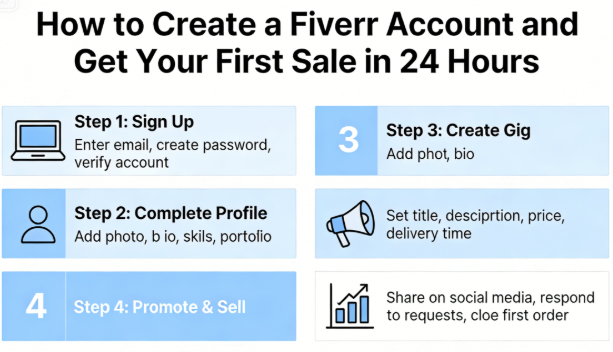
Step 1: Sign Up for Your Free Account
Head over to Fiverr’s signup page and create your account. You have a few options:
- Sign up with your email address (recommended for a professional look)
- Sign up with your Google account
- Sign up with your Apple ID
- Sign up with your Facebook account
I personally recommend using a dedicated email address for your freelancing business. It keeps things organized and looks more professional if you ever need to communicate with clients off-platform.
? Pro Tip: Choose your username carefully — it becomes part of your Fiverr URL (e.g., fiverr.com/yourusername) and you can’t change it later. Avoid random numbers or jokes. Something like “alexdesigns” or “sarahwrites” is clean and memorable.
Step 2: Complete Your Seller Profile
Once you’re signed up, switch to “Selling” mode by clicking on your profile and selecting “Become a Seller.” Now comes the part that most people rush through — and it costs them sales.
Your profile picture: Use a clear, friendly, well-lit headshot. Not a logo. Not a cartoon avatar. Profiles with real photos get 30-40% more clicks than those without, according to Fiverr’s own data. Smile. Look approachable. You’re selling you as much as your service.
Your display name: Use your real first name (or a professional-sounding name). It builds trust immediately.
Your description: This is your 600-character elevator pitch. Here’s a framework that works:
- Open with what you do and who you help (1 sentence)
- Mention your relevant experience or credentials (1-2 sentences)
- Highlight what makes you different (1 sentence)
- End with a friendly call-to-action (1 sentence)
Example: “Hi! I’m Alex, a graphic designer specializing in modern brand identities for startups and small businesses. With 5+ years of experience and over 200 projects completed, I create designs that don’t just look good — they convert. I’m known for fast turnarounds and unlimited revisions until you’re 100% happy. Message me anytime — I’d love to help bring your vision to life!”
Step 3: Fill in Every. Single. Field.
Fiverr’s algorithm favors complete profiles. That means:
- Languages — List every language you speak and your proficiency level
- Skills — Add up to 15 relevant skills (use keywords buyers would search for)
- Education — Even if it’s not directly related, fill this in
- Certifications — Got a Google Analytics cert? HubSpot? Coursera? Add them all
- Linked accounts — Connect your LinkedIn, GitHub, Dribbble, or portfolio site
Think of it this way: a 100% complete profile tells the algorithm you’re serious, and it tells buyers you’re legitimate. Both of those things directly affect whether your gigs show up in search results.
For more detailed guidance on optimizing every aspect of your Fiverr presence, check out our complete Fiverr guide.
Choosing Your First Gig: What to Sell on Fiverr (Even If You Think You Have No Skills)
This is where most beginners get stuck. They spend days overthinking, researching, and second-guessing themselves. Here’s my honest advice: your first gig doesn’t need to be perfect. It needs to exist.
That said, let’s be strategic about it. Some gig categories are much easier for new sellers to break into than others. Here’s a breakdown:
| Gig Category | Difficulty for Beginners | Average Starting Price | Demand Level | Time to Learn |
|---|---|---|---|---|
| Data Entry / Virtual Assistant | ⭐ Easy | $5 – $25 | ??? High | 1 – 2 days |
| Social Media Graphics (Canva) | ⭐ Easy | $10 – $50 | ??? High | 2 – 3 days |
| Blog/Article Writing | ⭐⭐ Moderate | $15 – $100 | ??? High | Self-taught |
| Video Editing (Basic) | ⭐⭐ Moderate | $20 – $100 | ??? High | 1 – 2 weeks |
| Voiceover | ⭐⭐ Moderate | $10 – $75 | ?? Medium | 3 – 5 days |
| Logo Design | ⭐⭐⭐ Competitive | $15 – $150 | ??? High | 2 – 4 weeks |
| Web Development | ⭐⭐⭐ Competitive | $50 – $500+ | ??? High | Months |
| AI-Assisted Services | ⭐ Easy | $10 – $100 | ???? Very High | 3 – 5 days |
My recommendation for absolute beginners? Start with something in the “Easy” category. Services like data entry, social media management, Canva design, or AI-assisted content creation have massive demand and low barriers to entry. You can always add more advanced Fiverr gigs later as you build your reputation.
Here’s a framework to identify your best starting gig:
- What do people already ask you to help with? (Friends, family, coworkers)
- What software or tools do you know how to use? (Even basic ones like Canva, Google Sheets, or ChatGPT)
- What tasks do you find easy that others find annoying? (Formatting documents, editing photos, organizing data)
The sweet spot is where your existing ability meets market demand. You don’t need to be an expert. You just need to be good enough to deliver value — and better than the buyer could do themselves.
Creating a Gig That Actually Gets Clicked (and Bought)
Okay, now we’re getting into the meat of this guide. You’ve set up your account, you’ve chosen your service — now it’s time to create a gig that stands out. This is where Fiverr tips from experienced sellers make all the difference.
Craft a Keyword-Rich Gig Title
Your gig title is the most important piece of text on your listing. It needs to do two things simultaneously: rank in Fiverr’s search and compel humans to click.
The formula I use:
“I will [specific service] + [for whom / what purpose]”
Examples:
- ❌ Bad: “I will do graphic design” (too vague)
- ✅ Good: “I will design modern social media posts for your Instagram brand”
- ❌ Bad: “I will write articles” (too generic)
- ✅ Good: “I will write SEO blog articles that drive organic traffic to your website”
Notice how the good examples include specific keywords that buyers would actually type into Fiverr’s search bar? That’s intentional. Spend 10 minutes browsing Fiverr’s search suggestions for your category before writing your title.
Write a Description That Sells
Your gig description needs to answer three questions the buyer is silently asking:
- “Can this person actually deliver what I need?” → Lead with your relevant experience and results
- “What exactly will I get?” → List specific deliverables clearly
- “Why should I choose this seller over others?” → Highlight your unique value proposition
Structure your description like this:
- Opening hook (2-3 sentences addressing their pain point)
- What you offer (bullet list of deliverables)
- Why choose you (experience, guarantees, fast delivery)
- What you need from them (requirements to get started)
- Call-to-action (“Order now” or “Message me to discuss your project”)
Use bold text, emojis, and line breaks to make it scannable. Walls of text kill conversions.
Set Up Your Gig Packages Strategically
Fiverr lets you create three pricing tiers: Basic, Standard, and Premium. This is a massive opportunity that most new sellers waste by barely differentiating between them.
Here’s a pricing psychology trick that works incredibly well:
| Package | Strategy | Example (Blog Writing Gig) | Price |
|---|---|---|---|
| Basic | Low barrier to entry — get the first order | 500-word blog post, 1 revision | $10 |
| Standard | The “sweet spot” — best value (most buyers pick this) | 1,000-word SEO article, 2 revisions, meta description | $30 |
| Premium | Anchor price — makes Standard look like a deal | 2,000-word pillar article, unlimited revisions, images, SEO optimization | $75 |
The Premium package isn’t necessarily there for people to buy it (though some will). It’s there to make your Standard package feel like a bargain by comparison. This is called price anchoring, and it’s used by every major SaaS company on the planet.
? Key Takeaway: For your very first gig, price your Basic package lower than you think you should. I know, I know — your work is worth more. But right now, your #1 goal isn’t maximizing revenue. It’s getting that first review. A 5-star review with a happy client’s comment is worth 10x whatever you “lost” by underpricing. You can raise prices after 5-10 reviews.
Create Eye-Catching Gig Images and Videos
Your gig thumbnail is the first thing buyers see in search results. If it looks amateur, they scroll right past — no matter how good your description is.
What works:
- Clean, high-contrast designs with bold text
- Use Canva’s free templates as a starting point
- Include a brief text overlay of what you offer (e.g., “Professional Logo Design”)
- Show a sample or mockup of your work
- Use a consistent color scheme across all gig images
What to avoid:
- Stock photos that look generic
- Blurry or low-resolution images
- Too much text crammed into the thumbnail
- Dark or dull color palettes
Gig videos are a game-changer. Fiverr reports that gigs with videos get up to 220% more orders than those without. You don’t need a Hollywood production — a 30-60 second video where you introduce yourself, explain your service, and ask the buyer to order is more than enough. Film it on your phone with good lighting and a clean background.
The 24-Hour First Sale Strategy: How to Land Your First Order FAST
Alright, this is the section you’ve been waiting for. Your account is set up, your gig is live, and now you want that sweet, sweet first sale. Here are the exact strategies that can make it happen within 24 hours.
? Ready to Start Earning on Fiverr?
If you haven’t already, now is the time to sign up for Fiverr here and start building your freelance business. It’s free to join, free to list gigs, and you could have your first sale before this time tomorrow. Over 830,000 freelancers are already earning — why not you?
Strategy 1: Use Buyer Requests (Fiverr’s Hidden Goldmine)
Most Fiverr for beginners guides mention Buyer Requests, but they don’t tell you how to actually win them. Here’s the deal: Buyer Requests is a section where clients post what they need, and sellers can submit proposals. Think of it as the reverse marketplace.
To stand out:
- Respond within minutes. Speed matters — the first 2-3 proposals get the most attention
- Personalize every single response. Reference their specific project, not a generic template
- Include a relevant sample. Attach or link to something similar to what they’re asking for
- Be concise. 3-5 sentences max. Buyers are busy
- End with a question. This opens a conversation and increases reply rates
? Pro Tip: Check Buyer Requests at least 3-4 times per day during your first week. Set phone reminders if you need to. The early bird genuinely gets the worm here — 72% of successful proposals on Fiverr are submitted within the first hour of the request being posted.
Strategy 2: Share Your Gig on Social Media (The Right Way)
I’m not talking about spamming your Facebook friends with “BUY MY GIG!!!” posts. That’s a one-way ticket to getting muted by everyone you know.
Instead, provide value first:
- Join relevant Facebook groups (entrepreneur groups, startup communities, small business forums)
- Answer questions and be genuinely helpful for a few days
- When someone asks for a recommendation for the type of service you offer, mention your Fiverr gig naturally
- Post portfolio content on Instagram, Twitter/X, LinkedIn, or TikTok with a link to your gig in your bio
- Use Reddit strategically — subreddits like r/forhire, r/slavelabour, and niche communities can drive targeted traffic
Even one outside sale can jumpstart your Fiverr ranking, because the algorithm sees that your gig is converting and starts showing it to more people organically.
Strategy 3: Optimize for Fiverr’s Search Algorithm
Fiverr’s search works similarly to Google’s — it rewards relevance, quality signals, and engagement. Here’s how to work with it from day one:
- Use all 5 search tags. Pick tags that buyers actually search for (look at Fiverr’s auto-suggestions)
- Stay online and responsive. Fiverr tracks your response time and online status — both affect ranking
- Set a fast delivery time. Gigs with 24-hour or 48-hour delivery rank higher in filtered searches
- Enable all extras and FAQs. Complete gig listings get preferential treatment
- Update your gig regularly. Even small edits signal to the algorithm that your gig is active
For a deeper dive into Fiverr’s ranking factors and how to optimize your gigs for maximum visibility, explore our freelancing resources.
Strategy 4: Offer a Launch Promotion
Here’s something bold but effective: for your first 3-5 orders, offer something extra that established sellers don’t. Maybe it’s:
- A faster turnaround time at no extra cost
- An additional revision
- A free bonus deliverable (e.g., “Order a logo and get a free social media avatar”)
Mention this in your gig description: “? Launch Special: For a limited time, all orders include [bonus] at no additional charge!”
This gives buyers a reason to take a chance on a new seller. Once you’ve built up reviews and credibility, you can remove the promotion and charge full price.
Strategy 5: The “Warm Outreach” Method
This is my secret weapon, and it’s surprisingly underutilized. Think about people in your existing network who might need your service:
- Does your friend run a small business that could use a new logo?
- Does your cousin need help editing YouTube videos?
- Is there a local business with a terrible social media presence?
Reach out personally. Not with a sales pitch, but with genuine value: “Hey! I just launched a graphic design service on Fiverr. I’d love to create some social media templates for your bakery — my treat for the first one, and if you like it, maybe you could leave a review?”
That first review is worth its weight in gold. It breaks the “zero reviews” barrier that makes many buyers hesitant to order from new sellers.
Common Mistakes That Kill Your First Sale (and How to Avoid Them)
I’ve seen countless new sellers sabotage themselves with avoidable mistakes. Let me save you the heartache:
Mistake 1: Pricing Too High (or Too Low)
Setting your Basic package at $100 when you have zero reviews? Nobody’s taking that gamble. But pricing at $1 signals desperation and attracts nightmare clients. Sweet spot for beginners: $5-$25 for your Basic tier, depending on the category.
Mistake 2: Copying Other Sellers’ Gigs
It’s fine to research competitors for inspiration. It’s not fine to copy their descriptions, images, or titles. Fiverr’s algorithm can detect duplicate content, and buyers can spot a copycat from a mile away. Be authentic — it’s your biggest competitive advantage as a new seller.
Mistake 3: Ignoring Messages
Your response rate is displayed publicly on your profile, and Fiverr’s algorithm uses it as a ranking factor. Aim to respond to every message within 1 hour. Download the Fiverr mobile app and turn on push notifications. Seriously — this alone can make or break your success.
Mistake 4: Not Using All Gig Slots
New sellers get 7 active gig slots. Use them all. Each gig is a separate chance to appear in search results. Even if you’re focused on one main service, create variations targeting different keywords or niches.
Mistake 5: Giving Up Too Soon
Some sellers don’t get their first sale in 24 hours. That’s okay. The strategies in this guide dramatically increase your odds, but the reality is that some niches take a few days to gain traction. The sellers who succeed are the ones who keep optimizing, keep responding to buyer requests, and keep showing up. Don’t delete your gig after 3 days of silence — tweak it instead.
After Your First Sale: How to Build Momentum
Congratulations — imagine waking up to a notification: “You’ve got a new order! ?” That first $10, $20, or $50 hits different. But the real question is: how do you turn one sale into consistent freelance income?
Deliver an Outstanding Experience
Your first client is your most important client. Over-deliver. Communicate proactively. Submit before the deadline. And when you deliver, include a friendly note like:
“Thanks so much for your order! I really enjoyed working on this. If you’re happy with the result, I’d be incredibly grateful for a 5-star review — it means the world to new sellers like me. And if anything needs tweaking, just let me know — I’m here to make sure you’re 100% satisfied!”
That first 5-star review is the domino that tips everything. It boosts your search ranking, builds social proof, and makes the next buyer way more likely to order.
Scale Smart: From $50/Month to $500/Month and Beyond
Once you have 5-10 reviews under your belt, it’s time to scale:
- Raise your prices by 20-30% — You’ve earned it, and buyers now have proof you deliver
- Add gig extras — “Extra-fast delivery,” “Additional revisions,” “Source files” — these can double your order value
- Create complementary gigs — If you design logos, add a gig for brand guidelines or business card design
- Develop repeat clients — Most successful Fiverr sellers earn 50%+ of their income from returning customers
- Invest in skills — Learn advanced techniques that let you charge premium prices
Many sellers I know went from $0 to $500/month within 60-90 days, and some hit $2,000+/month within 6 months. The compounding effect of reviews, returning clients, and algorithm ranking is powerful once it starts rolling.
For more strategies on growing your Fiverr income, check out more Fiverr tips on our resource hub.
Fiverr Seller Levels: What to Know and Why They Matter
Fiverr has a level system that rewards consistent, quality sellers with more visibility and perks. Here’s a quick overview:
| Level | Requirements | Key Benefits |
|---|---|---|
| New Seller | Just signed up | Up to 7 active gigs |
| Level 1 | 60+ days active, 10+ orders completed, 4.7+ rating | Up to 10 active gigs, custom offers, priority support |
| Level 2 | 120+ days active, 50+ orders, 4.7+ rating, $2,000+ earned | Up to 20 gigs, eligibility for Seller Plus, priority placement |
| Top Rated | 180+ days, $20,000+ earned, exceptional metrics | VIP support, featured placement, Top Rated badge |
Why this matters right now: Every order you complete and every positive review you earn pushes you toward Level 1. And Level 1 unlocks significantly more visibility in Fiverr’s search results. It’s a virtuous cycle — the more you sell, the easier it becomes to sell more.
Tools and Resources to Supercharge Your Fiverr Success
You don’t need fancy tools to start, but a few free or affordable resources can give you a serious edge:
- Canva (Free) — Create professional gig images, portfolio samples, and social media graphics
- Grammarly (Free) — Catch typos in your gig descriptions and client communications
- Google Trends (Free) — Research what services are trending to inform new gig ideas
- Fiverr’s own analytics — Track impressions, clicks, and conversion rates for each gig
- Loom (Free) — Record quick video responses to client messages (builds trust fast)
- Toggl (Free) — Track your time to understand your real hourly rate
As you grow, consider investing in tools specific to your niche — Adobe Creative Suite for designers, Jasper or SurferSEO for writers, DaVinci Resolve for video editors, etc.
Frequently Asked Questions About Creating a Fiverr Account
Is it free to create a Fiverr account and start selling?
Yes, it’s 100% free to create your free Fiverr account and list up to 7 gigs. Fiverr makes money by taking a 20% commission on completed orders. You only pay when you earn — there are no upfront fees, subscription costs, or hidden charges to get started.
How long does it take to get your first sale on Fiverr?
With the right optimization strategies — competitive pricing, keyword-rich gig titles, professional images, and active use of Buyer Requests — many sellers land their first order within 24-72 hours. However, some niches are more competitive. On average, well-optimized new sellers report getting their first sale within 1-2 weeks.
Can you really make a living on Fiverr, or is it just pocket money?
Both are possible — it depends on your skills, pricing, and commitment. Many sellers earn $200-$500/month as a side hustle working just a few hours per week. Top Rated Sellers in high-demand categories regularly earn $5,000-$15,000+ per month. The key is starting small, building reviews, and gradually increasing your prices.
What skills are most in demand on Fiverr in 2026?
AI-assisted services (AI image generation, ChatGPT-based content, AI video editing) are exploding in demand. Other consistently high-demand categories include web development, graphic design, video editing, SEO services, social media management, and virtual assistance. E-commerce related services like product photography editing and Amazon listing optimization are also growing rapidly.
Can I have more than one Fiverr account?
No — Fiverr’s terms of service strictly prohibit multiple accounts. If you’re caught with more than one account, both accounts will be permanently banned. Instead, maximize your single account by using all 7 gig slots and diversifying within your niche.
How do I get paid on Fiverr, and how long does it take?
After you deliver an order and it’s marked as complete, your funds go through a 14-day clearing period (7 days for Top Rated Sellers). Once cleared, you can withdraw via PayPal, bank transfer, Fiverr Revenue Card, or direct deposit. The minimum withdrawal is $5.
Conclusion: Your Fiverr Journey Starts Right Now
Let’s recap everything we’ve covered in this guide. To successfully create a Fiverr account and land your first sale quickly, remember these key steps:
- Set up a complete, professional profile — Real photo, compelling description, all fields filled in
- Choose a beginner-friendly gig category with high demand and low competition
- Craft a keyword-optimized gig with a compelling title, detailed description, strategic pricing tiers, and eye-catching images
- Use the 24-hour launch strategies — Buyer Requests, social media promotion, warm outreach, and algorithm optimization
- Over-deliver on your first orders to earn 5-star reviews that fuel long-term growth
Look, I’m not going to pretend it’s magic. Building a freelance business takes work. But the beautiful thing about Fiverr is that the barrier to entry is zero. No startup costs. No fancy equipment. No résumé required. Just you, a skill (even a basic one), and the willingness to put yourself out there.
Six months from now, you could have dozens of glowing reviews, a steady stream of freelance income, and the freedom that comes with being your own boss. Or six months from now, you could still be thinking about it.
Don’t be that person.
? Take Action Today — Your First Sale Is Waiting
Everything you need to know is in this guide. The only thing left is to actually do it. Join Fiverr today, set up your profile, create your first gig, and start applying these strategies. Your future freelancing self will thank you.
And once you’re set up, come back and explore our complete Fiverr resource hub for more tips, gig ideas, and strategies to accelerate your growth. You’ve got this. ?


Leave a Reply