



How to Write a Fiverr Gig Description That Actually Sells [2026 Step-by-Step Guide]
Here’s a stat that might sting a little: over 70% of Fiverr gigs never receive a single order. Not because the freelancers behind them lack talent — but because their gig titles and descriptions fail to convince anyone to click “Continue.”
If you’ve set up your Fiverr profile, published a gig, and then heard nothing but crickets, you’re not alone. The truth is, writing a Fiverr gig description that converts is a skill most new sellers completely overlook. They spend hours perfecting their portfolio but only two minutes slapping together a description that reads like a boring resume.
That ends today. In this guide, I’m going to walk you through exactly how to craft gig titles and descriptions that grab attention, build trust, and turn casual browsers into paying clients. You’ll get real-world examples, copy-paste templates, and the same strategies that helped me go from $0 to over $3,500/month on the platform. Whether you’re brand new to freelancing or just struggling to get traction, this is the playbook you need.
Let’s fix your gigs — starting right now.
Why Your Fiverr Gig Description Matters More Than You Think
Think of Fiverr like a massive digital marketplace — because that’s exactly what it is. There are over 830,000 active freelancers offering millions of gigs across hundreds of categories. When a buyer searches for a service, they see a wall of options that all look surprisingly similar.
So what makes them choose your gig over the other 200 results? It’s not luck. It’s your gig title, your thumbnail, and — most critically — your Fiverr gig description.
Here’s how the buyer journey actually works on the platform:
- The title and thumbnail get the click (first impression).
- The description builds trust and answers objections (the convincing).
- The pricing and reviews close the deal (the conversion).
If your description is weak, vague, or all about you instead of the buyer’s problem, they bounce. They don’t message you to ask questions. They just leave. A well-written description, on the other hand, does the selling for you — 24 hours a day, 7 days a week, even while you sleep.
I remember when I first started on Fiverr back in the day. My original gig description was something like: “I am a professional graphic designer with 5 years of experience. I will design logos for you.” Riveting, right? I got zero orders for three weeks. The moment I rewrote it using the strategies I’m about to share, I landed my first order within 48 hours. Coincidence? Not even close.
If you haven’t created your account yet, you can sign up for Fiverr here and follow along as we build your gig from scratch.
How to Write a Fiverr Gig Title That Gets Clicks
Before we dive into the description, let’s nail the title first — because if nobody clicks on your gig, nobody’s reading your description anyway.
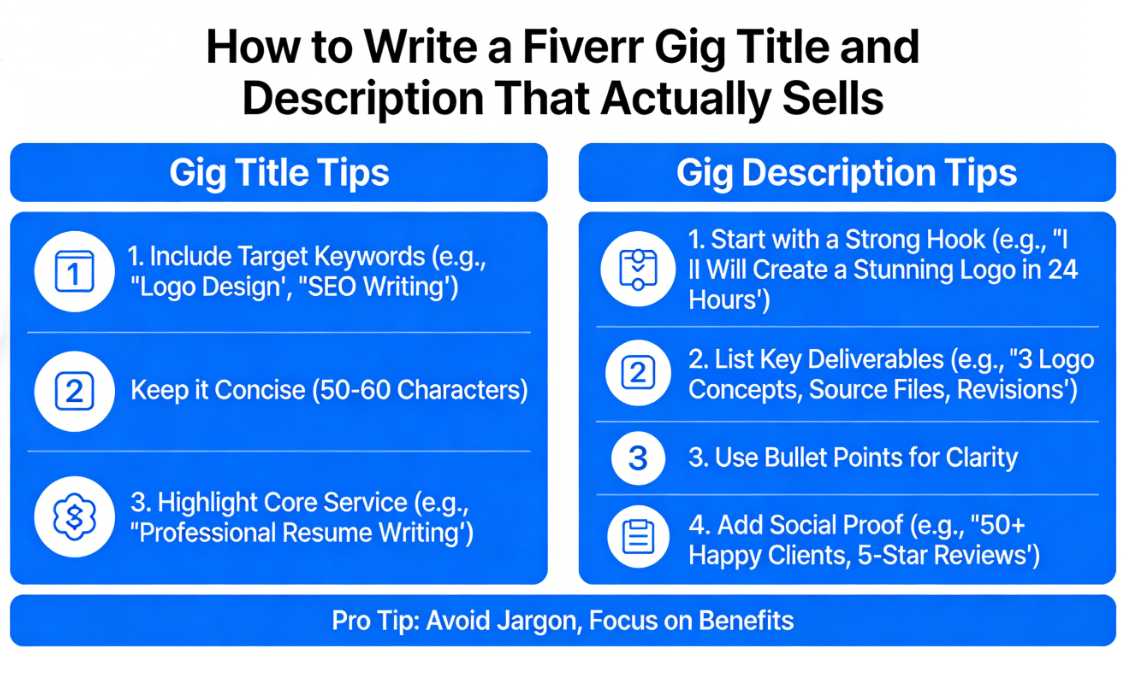
Fiverr gives you 80 characters for your gig title. Every single one counts. Here’s the formula that works:
The Winning Gig Title Formula
The best Fiverr gig titles follow this structure:
“I will [specific service] + [benefit or result] + [for whom/niche]”
Fiverr requires every title to start with “I will” — so you don’t have a choice there. But what comes after those two words makes all the difference. Let’s look at some examples:
| ❌ Weak Gig Title | ✅ Strong Gig Title | Why It’s Better |
|---|---|---|
| I will design a logo | I will design a modern minimalist logo for your brand | Specific style + target audience |
| I will write articles | I will write SEO blog articles that rank on Google | Clear benefit (ranking on Google) |
| I will edit your video | I will edit your YouTube video with effects and subtitles | Specifies platform + deliverables |
| I will do data entry | I will do fast and accurate data entry for your business | Highlights speed and accuracy |
| I will be your virtual assistant | I will be your reliable virtual assistant for admin tasks | Adds trust (reliable) + scope |
5 Rules for Fiverr Gig Titles
- Include your main keyword. If buyers search “logo design,” your title needs those words. Think about what someone would actually type into the Fiverr search bar.
- Be specific, not generic. “Modern minimalist logo” beats “logo” every time. Specificity attracts the right buyers and weeds out the tire-kickers.
- Mention a benefit or result. Don’t just say what you do — say what the buyer gets. “SEO blog articles that rank on Google” paints a picture of success.
- Avoid keyword stuffing. “I will design logo design graphic design brand design” looks spammy and will actually hurt your ranking.
- Skip the ALL CAPS and special characters. They scream desperation. A clean, professional title builds trust.
? Pro Tip: Research your competitors before writing your title. Search for your service on Fiverr, look at the top-ranking gigs, and notice the patterns. Then differentiate yourself by being more specific or highlighting a unique angle.
How to Write a Fiverr Gig Description That Converts (Step-by-Step)
Alright, here’s the meat of this guide. Your Fiverr gig description gets up to 1,200 characters, and you should use every single one of them strategically. Think of it as a mini sales page — not a place to dump your resume.
I’m going to break this down into a proven structure you can follow no matter what service you offer.
Step 1: Open With a Hook That Speaks to Their Pain
Most sellers start their description with “Hi, I’m [name] and I have X years of experience.” The buyer doesn’t care — at least not yet. They care about their problem.
Start by calling out their struggle or desire. Here are some examples:
- For logo design: “Struggling to find a logo that actually captures your brand’s personality? You’re in the right place.”
- For blog writing: “Tired of publishing blog posts that get zero traffic? Let’s change that.”
- For video editing: “Your content is great — but bad editing is killing your views. I can fix that.”
This immediately tells the buyer: “This person understands my problem.” That’s the first step to building trust.
Step 2: Present Yourself as the Solution
Now — and only now — do you briefly introduce yourself and your qualifications. But frame everything in terms of what it means for the buyer.
Instead of: “I have 5 years of experience in graphic design.”
Try: “With 5 years of experience and over 500 completed projects, I know exactly how to create a logo that makes your business look professional and memorable.”
See the difference? Same information, but one is a fact and the other is a promise of value.
Step 3: List What’s Included (Use Bullet Points)
Buyers skim. They don’t read walls of text. Make it easy for them to see exactly what they’re getting. Use bullet points or a clear list:
- ✅ Custom, hand-crafted logo design (no templates)
- ✅ 3 initial concepts to choose from
- ✅ Unlimited revisions until you’re 100% happy
- ✅ Final files in PNG, JPG, SVG, and PDF
- ✅ Full commercial rights included
- ✅ 48-hour delivery
This removes guesswork and makes the buyer feel confident they know what they’re paying for. It also reduces the number of “What do I get?” messages, saving you time.
Step 4: Add Social Proof or a Credibility Booster
If you’re new and don’t have reviews yet, don’t panic. You can still build credibility by mentioning:
- Relevant education or certifications
- The number of projects you’ve completed (even outside Fiverr)
- Specific tools or software you use
- A satisfaction guarantee (e.g., “unlimited revisions” or “money-back guarantee”)
If you do have reviews, reference them: “Join 200+ happy clients who’ve rated my work 5 stars.”
Step 5: Close With a Clear Call to Action
Don’t just end your description and hope for the best. Tell the buyer exactly what to do next:
- “Click Order Now to get started today!”
- “Message me before ordering so I can give you a custom quote.”
- “Hit Contact Me with your project details — I reply within 1 hour.”
A clear CTA reduces friction and moves the buyer toward action. This is one of the simplest Fiverr tips that most beginners miss entirely.
? Ready to Start Earning on Fiverr?
There’s no better time than right now. Fiverr is free to join, and you can publish your first gig in under 15 minutes. Stop waiting and start building your freelance income today.
Real Fiverr Gig Description Examples (Copy and Customize)
Let me give you two complete Fiverr gig description templates you can adapt for your own services. These follow the exact structure I outlined above.
Example 1: Logo Design Gig Description
Need a logo that makes your brand unforgettable? You’ve come to the right place.
I’m a professional graphic designer with 6+ years of experience creating clean, modern logos for startups, small businesses, and personal brands. My designs don’t just look good — they tell your brand’s story.
What you’ll get:
✅ 3 unique logo concepts
✅ Unlimited revisions
✅ High-res files (PNG, JPG, SVG, PDF, AI)
✅ Full ownership and commercial rights
✅ Social media kit (bonus!)
✅ 24-48 hour turnaroundI’ve designed 400+ logos with a 4.9-star average rating. Your satisfaction is my top priority — if you’re not happy, I’ll keep revising until you are.
Ready to get a logo you love? Click “Order Now” or message me with your ideas!
Example 2: SEO Blog Writing Gig Description
Publishing blog posts that nobody reads? Let’s fix that.
I write SEO-optimized blog articles that don’t just rank on Google — they actually engage your readers and drive conversions. Every article is 100% original, thoroughly researched, and tailored to your niche.
What’s included:
✅ Keyword research and strategic placement
✅ Engaging, human-sounding content (no AI fluff)
✅ SEO meta title and description
✅ Internal linking suggestions
✅ Royalty-free images
✅ 1 free revisionI’ve written for clients in health, finance, tech, travel, and e-commerce — and my articles have generated over 2 million organic page views combined.
Message me with your topic or keyword, and I’ll get started right away!
Feel free to swipe and customize these for your own Fiverr gigs. Just make sure to inject your own personality and specific credentials. For more templates and strategies, check out more Fiverr tips on our hub page.
10 Power Tips to Make Your Fiverr Gig Description Stand Out
Now that you have the structure down, let’s level up with some advanced strategies that separate top sellers from everyone else.
1. Use Keywords Naturally (But Strategically)
Fiverr has its own search algorithm, and it pays attention to keywords in your gig title, description, tags, and metadata. Research what buyers search for using Fiverr’s autocomplete feature — just start typing in the search bar and see what suggestions pop up. Weave those terms into your description naturally.
2. Write for Skimmers
Most buyers spend less than 15 seconds scanning your description before deciding to read further or bounce. Use short paragraphs, bullet points, bold text, and clear headers. Make the key information impossible to miss.
3. Focus on Benefits, Not Just Features
There’s a classic marketing distinction here. A feature is “unlimited revisions.” A benefit is “you’ll get a design you absolutely love — guaranteed.” Always connect what you offer to what the buyer actually wants.
4. Address Objections Before They Come Up
Think about why someone might hesitate to order from you:
- “What if I don’t like it?” → Mention your revision policy.
- “Will it be delivered on time?” → State your turnaround time.
- “Is this person legit?” → Add social proof and credentials.
5. Use Urgency (Without Being Sleazy)
Phrases like “limited slots available this week” or “order now and get a free bonus” can nudge hesitant buyers. Just make sure it’s genuine — fake scarcity will backfire.
6. Optimize Your Gig Tags
Fiverr lets you add up to 5 search tags per gig. These matter a lot for discoverability. Use a mix of broad keywords (“logo design”) and specific long-tail phrases (“minimalist logo for startup”). This is a Fiverr tip for beginners that can make a real difference in your search visibility.
7. Update Your Description Regularly
Fiverr’s algorithm tends to favor gigs that are actively maintained. Every few weeks, tweak your description — update your project count, refine your wording, or add new services. Think of it like tending a garden.
8. Use the FAQ Section Wisely
Fiverr gives you a separate FAQ section below your gig description. Use it! Answer common questions that buyers ask before ordering. This reduces back-and-forth messages and increases conversion rates because buyers feel more informed.
9. Include a Portfolio or Samples
Your gig description works hand-in-hand with your gig images, videos, and portfolio. Reference them in your description: “Check out my portfolio below to see recent examples of my work.” This creates a seamless browsing experience.
10. Test, Tweak, Repeat
Your first version won’t be perfect — and that’s fine. Track your gig’s impressions, clicks, and conversion rate in Fiverr’s analytics dashboard. If people are clicking but not ordering, your description needs work. If they’re not clicking at all, your title or thumbnail is the problem.
? Key Takeaway: Treat your gig description like a living document. The top Fiverr sellers are constantly testing new approaches, refining their language, and optimizing based on data. That’s how they consistently earn $5,000–$10,000+ per month in freelance income.
Common Fiverr Gig Description Mistakes (And How to Fix Them)
I’ve reviewed hundreds of gig descriptions while mentoring new sellers, and the same mistakes come up again and again. Here’s what to avoid:
| Mistake | Why It Hurts You | What to Do Instead |
|---|---|---|
| Starting with “Hi, I’m [name]” | Buyers don’t care about you yet — they care about their problem | Lead with a pain point or benefit |
| Being too vague (“I will do amazing work”) | Tells the buyer nothing specific | List exact deliverables and results |
| Writing a wall of text | Nobody reads it; buyers bounce | Use bullets, short paragraphs, and bold text |
| Copying another seller’s description | Fiverr can flag duplicates; it also erodes trust | Write in your own voice with unique angles |
| No call to action | Buyer finishes reading and… does nothing | End with a clear, specific next step |
| Overselling or making fake promises | Leads to disappointed clients and bad reviews | Be honest and let your work speak for itself |
Honestly, just avoiding these six mistakes will put you ahead of 80% of sellers on the platform. Combine that with the strategies we’ve covered, and you’re positioning yourself for real success.
How to Optimize Your Entire Fiverr Gig for Maximum Visibility
Your description is crucial, but it doesn’t exist in a vacuum. To really crush it on Fiverr, you need to optimize everything — from your profile to your packages. Here’s a quick breakdown:
Profile Optimization
- Use a professional, friendly photo (faces convert better than logos)
- Write a compelling profile bio that mirrors the tone of your gig descriptions
- Add relevant skills, education, and certifications
- Link your portfolio website or social media
Gig Image and Video
- Your gig thumbnail is the first thing buyers see — invest time in making it clean, eye-catching, and on-brand
- A gig video (even a simple 30-second one) can increase conversions by up to 40% according to Fiverr’s own data
- Show samples of your work in your gallery images
Pricing Packages
- Use all three tiers: Basic, Standard, and Premium
- Make your Basic package an irresistible entry point (low risk for the buyer)
- Upsell valuable extras in Standard and Premium
- Many successful sellers report that 60-70% of their revenue comes from Standard and Premium packages
For a deep dive into all of these strategies, explore our complete Fiverr guide where we cover everything from account setup to scaling your freelance income.
What to Do After Publishing Your Gig
Writing an amazing Fiverr gig description is just the beginning. Here’s what to do once your gig is live to start landing orders faster:
- Share your gig on social media. Post it on LinkedIn, Twitter/X, Facebook groups, and Reddit (where allowed). External traffic signals can boost your Fiverr search ranking.
- Use Fiverr’s “Buyer Requests” feature. Browse open requests from buyers looking for your service and send personalized proposals. This is one of the best ways to land your first few orders as a new seller.
- Respond to messages lightning fast. Fiverr tracks your response time, and it affects your gig’s visibility. Aim to respond within 1 hour during business hours.
- Deliver exceptional work (and over-deliver). Your first few reviews are everything. Include a small bonus or extra revision to wow your early clients.
- Ask for reviews politely. After delivering, a simple “If you’re happy with the work, I’d really appreciate a review — it helps my small business a lot!” goes a long way.
Imagine waking up tomorrow morning, checking your phone, and seeing “You have a new order! — $150” in your Fiverr notifications. That’s not a fantasy — it’s what happens when you combine a great gig description with consistent effort. Plenty of freelancers earn $500 to $2,000+ per month on the side, and many have turned it into a full-time remote work career.
Fiverr Gig Description for Beginners: A Quick-Start Checklist
If you’re feeling overwhelmed, here’s a simplified checklist you can follow. Bookmark this page and come back to it every time you create a new gig:
- ☐ Title: Starts with “I will,” includes main keyword, specific service, and a benefit
- ☐ Opening line: Addresses the buyer’s pain point or desire
- ☐ About you: 1-2 sentences framed as “here’s why I can help you“
- ☐ What’s included: Bullet-point list of deliverables
- ☐ Social proof: Reviews, project count, credentials, or guarantee
- ☐ CTA: Clear instruction on what to do next
- ☐ Tags: 5 relevant search tags
- ☐ Images: Professional thumbnail + portfolio samples
- ☐ Video: Short intro video (highly recommended)
- ☐ FAQ: 3-5 common questions answered
- ☐ Packages: All three tiers filled out with clear value differences
If you haven’t already, go ahead and get started on Fiverr — it’s completely free to create an account and publish your first gig. There’s literally nothing to lose.
Frequently Asked Questions About Fiverr Gig Descriptions
How long should a Fiverr gig description be?
Fiverr allows up to 1,200 characters for your gig description. You should aim to use at least 800-1,000 characters to provide enough detail. Cover your opening hook, deliverables, credentials, and a call to action. Don’t pad it with filler — every sentence should serve a purpose and help convince the buyer to order.
Can I change my Fiverr gig description after publishing?
Yes! You can edit your gig title, description, tags, pricing, and images at any time. In fact, regularly updating your gig is recommended. Fiverr’s algorithm tends to give a visibility boost to recently updated gigs. Just avoid making drastic changes right after getting a string of good reviews, as it may temporarily affect your ranking.
What keywords should I use in my Fiverr gig description?
Use keywords that buyers actually search for on the platform. Start by typing your service into Fiverr’s search bar and noting the autocomplete suggestions. Include your primary keyword in your title and description, and use related terms naturally. For example, if your main keyword is “logo design,” also use phrases like “brand identity,” “business logo,” and “custom logo.” Don’t stuff keywords unnaturally — Fiverr can penalize that.
How do I write a Fiverr gig description with no experience?
Focus on what you can offer rather than what you lack. Highlight your skills, tools you use, and your commitment to quality. Offer a competitive price and generous revision policy to reduce buyer risk. You can also mention relevant coursework, personal projects, or volunteer work. Everyone starts somewhere — and many buyers on Fiverr are specifically looking for affordable new talent. Check out our freelancing resources for more beginner-friendly strategies.
Does Fiverr’s algorithm consider my gig description for search ranking?
Yes, Fiverr’s search algorithm factors in keywords from your gig title, description, tags, and metadata. However, it also weighs click-through rate, conversion rate, response time, order completion rate, and reviews. So while optimizing your description for keywords is important, delivering great service and maintaining strong seller metrics matters just as much — if not more.
How many Fiverr gigs can I create as a new seller?
New sellers on Fiverr can publish up to 7 active gigs. As you level up (to Level 1, Level 2, and Top Rated), you unlock the ability to create more gigs. Start with 2-3 well-optimized gigs rather than 7 mediocre ones. Quality beats quantity every time — especially when you’re building your reputation and trying to grow your freelance income.
Conclusion: Your Fiverr Gig Description Is Your 24/7 Salesperson
Let’s bring it all together. Writing a killer Fiverr gig description isn’t rocket science — but it does require intention, strategy, and a willingness to put yourself in the buyer’s shoes.
Here are the key takeaways from this guide:
- Your gig title needs to be specific, keyword-rich, and benefit-driven — not generic and forgettable.
- Your description should follow a proven structure: hook → solution → deliverables → social proof → CTA.
- Write for the buyer, not for yourself. Every sentence should answer the question: “What’s in it for them?”
- Use formatting (bullets, bold, short paragraphs) to make your description scannable and easy to digest.
- Treat your gig as a living document. Test, tweak, and optimize based on real performance data.
The difference between a gig that collects dust and one that generates consistent freelance income often comes down to a few hundred well-chosen words. You now have the exact framework, templates, and Fiverr tips to write descriptions that actually convert.
So here’s my challenge to you: Don’t just read this guide — act on it. Open Fiverr right now, create or revise your gig, and apply what you’ve learned. Your future self (the one checking their phone and seeing new orders every morning) will thank you.
? Your Next Step: Launch Your Fiverr Gig Today
Whether you’re a writer, designer, developer, video editor, or virtual assistant — there are buyers on Fiverr right now looking for exactly what you offer. Don’t let a weak gig description stand between you and your first $1,000.
Join Fiverr today — it’s 100% free to get started →
Already have a Fiverr account? Go revise your top gig using the strategies above and watch what happens over the next 7 days.
Found this guide helpful? Explore our complete Fiverr resource hub for more tips on growing your freelance business, landing more clients, and building real income online.


Leave a Reply