



Fiverr SEO Tips: How to Rank Your Gigs on Page 1 [2026 Step-by-Step Guide]
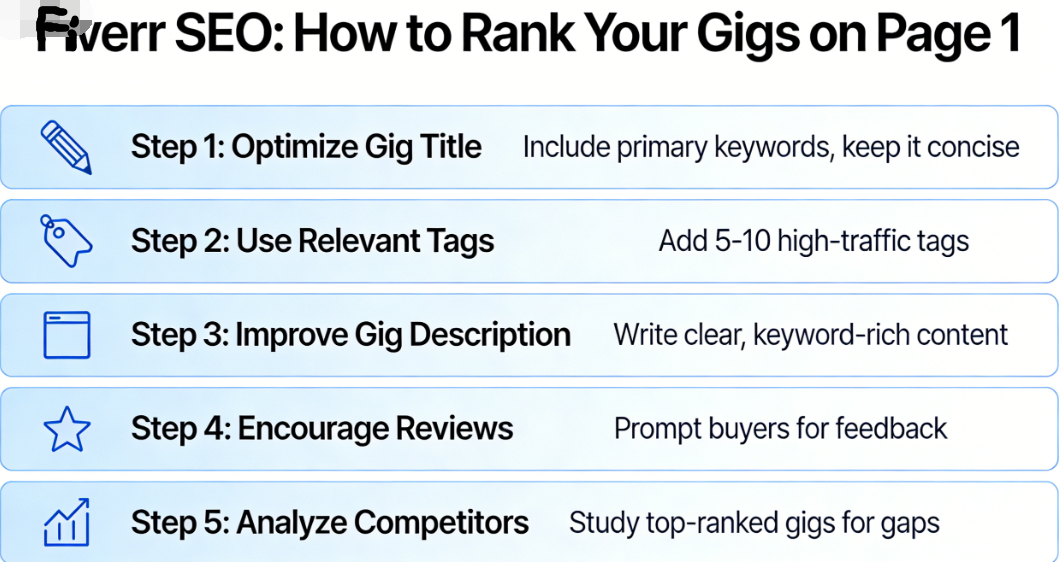
Here’s a stat that might surprise you: over 830,000 freelancers are actively selling services on Fiverr right now. That means when a buyer searches for “logo design” or “blog writing,” your gig is competing against thousands — sometimes tens of thousands — of other sellers.
So how do some freelancers consistently land on page 1 while others are buried on page 15, collecting digital dust? The answer comes down to one thing: Fiverr SEO tips that actually work.
If you’ve been pouring effort into your gigs but getting crickets, I feel you. I remember the frustration of refreshing my dashboard and seeing zero impressions. But once I cracked Fiverr’s ranking algorithm, everything changed. Within 60 days, my primary gig went from invisible to the top of page 1 — and my monthly earnings jumped from $50 to over $2,800.
In this guide, I’m going to break down exactly how Fiverr search works, share the step-by-step optimization strategy I use, and give you actionable Fiverr tips you can implement today. Whether you’re brand new or you’ve been selling for a while, this is the playbook you need to get your gigs seen, clicked, and ordered.
Understanding Fiverr’s Search Algorithm (Why Most Sellers Get It Wrong)
Before we dive into tactics, let’s talk about how Fiverr’s search engine actually works. Because here’s the thing — Fiverr’s algorithm isn’t Google. It has its own unique set of ranking factors, and if you treat it like Google SEO, you’ll waste a lot of time.
Fiverr’s search algorithm considers several key factors when deciding which gigs to display:
- Relevance — How well does your gig match what the buyer typed in?
- Performance — What’s your click-through rate, conversion rate, and order completion rate?
- Seller Reputation — Your reviews, ratings, response time, and overall account health.
- Recency and Activity — How recently you’ve been active, delivered orders, or updated your gig.
- Buyer Satisfaction Signals — Repeat buyers, low cancellation rates, and on-time delivery.
The mistake most sellers make? They obsess over keywords while ignoring performance metrics. Fiverr doesn’t just want the most “relevant” gig — it wants the gig that’s most likely to result in a satisfied buyer. That’s the core philosophy behind everything we’re about to cover.
Think of it this way: Fiverr makes money when transactions happen. So the algorithm is designed to surface gigs that convert browsers into buyers. Your job is to send every possible signal that your gig is a winner.
🔑 Key Takeaway: Fiverr SEO isn’t just about stuffing keywords. It’s about optimizing for relevance + performance + trust. Nail all three, and the algorithm will reward you with page 1 visibility.
Step 1: Master Fiverr Gig Title Optimization (Your Most Important SEO Element)
Your gig title is the single most important ranking factor on Fiverr. It’s the first thing both the algorithm and potential buyers see, so you need to get this right.
The Anatomy of a Perfect Fiverr Gig Title
Fiverr gig titles must start with “I will” — that’s non-negotiable. But what comes after those two words makes all the difference. Here’s the formula I use:
“I will” + [primary service keyword] + [specific benefit or differentiator]
Let me show you the difference between a bad title and a great one:
| ❌ Weak Title | ✅ Optimized Title | Why It’s Better |
|---|---|---|
| I will design a logo | I will design a modern minimalist logo for your business | More specific, includes buyer-relevant keywords |
| I will write articles | I will write SEO blog articles that rank on Google | Highlights the outcome the buyer wants |
| I will edit your video | I will professionally edit your YouTube video with effects | Specifies platform and quality level |
| I will do data entry | I will do fast and accurate data entry and web research | Adds related service keyword and benefit |
Title Optimization Tips That Actually Work
- Research before you write. Go to Fiverr and search for your service. Look at what top-ranked sellers use in their titles. Don’t copy them — but notice the patterns and keywords.
- Use your primary keyword early. Place the most important search term as close to “I will” as possible.
- Don’t keyword stuff. “I will design logo graphic design branding identity” reads like spam and turns buyers off.
- Be specific about the outcome. Buyers don’t just want a “logo” — they want a “professional logo that makes their brand stand out.”
- Stay within the character limit. Fiverr gives you 80 characters. Use as many as you can, but make every word count.
If you haven’t created your first gig yet, now’s the perfect time to sign up for Fiverr here and start applying these title strategies from day one.
Step 2: Choose the Right Category and Subcategory
This sounds basic, but you’d be shocked how many sellers mess this up. Placing your gig in the wrong category is like putting a steak restaurant in the vegetarian food court — you’ll attract the wrong crowd and tank your conversion rate.
Fiverr’s algorithm uses your category selection to determine which searches your gig appears in. If you offer “WordPress website design” but place your gig under “Graphics & Design > Logo Design,” you’re immediately hurting your visibility for the right keywords.
Here’s what to do:
- Search for your service on Fiverr and note which categories the top results fall under.
- Pick the most specific subcategory available. “Website Development > WordPress” is better than just “Programming & Tech.”
- If your service spans multiple categories, create separate gigs for each one (Fiverr allows up to 7 active gigs).
- Add relevant service metadata — Fiverr sometimes asks for things like website type, design style, or software used. Fill out every field completely.
Getting the category right sets the foundation. Get it wrong, and no amount of keyword optimization will save you. For more foundational advice like this, check out our complete Fiverr guide.
Step 3: Optimize Your Fiverr Tags Like a Pro
Fiverr gives you 5 search tags per gig — and they are absolute gold for SEO. Tags are essentially keywords that tell Fiverr’s algorithm what your gig is about. Use them wisely, and you can rank for multiple search terms with a single gig.
How to Research the Best Tags
Here’s my exact process for finding high-impact tags:
- Use Fiverr’s search bar autocomplete. Start typing your service and see what suggestions pop up. These are real search terms that buyers are using right now.
- Analyze top competitors. While Fiverr doesn’t publicly display tags, you can often infer them from the gig title, description, and the search terms where the gig appears.
- Mix broad and specific tags. For example, if you’re a logo designer: “logo design” (broad), “minimalist logo” (specific), “business logo” (niche), “brand identity” (related), “custom logo” (intent-driven).
- Think like a buyer. What would someone type into Fiverr’s search bar when looking for exactly what you offer?
Tag Strategy That Maximizes Visibility
| Tag Slot | Strategy | Example (for a blog writer) |
|---|---|---|
| Tag 1 | Primary keyword (exact match) | blog writing |
| Tag 2 | Close variation | SEO blog post |
| Tag 3 | Niche-specific keyword | content writing |
| Tag 4 | Buyer intent keyword | website content |
| Tag 5 | Related service keyword | article writing |
💡 Pro Tip: Don’t waste a tag slot on something too broad like “freelance” or too obscure like “ultrapremium bespoke content solutions.” Find the sweet spot between search volume and specificity.
Step 4: Write a Gig Description That Converts and Ranks
Your gig description serves a dual purpose: it needs to convince the buyer to order and signal relevance to Fiverr’s algorithm. A lot of sellers write descriptions that do neither — they’re either a wall of text nobody reads or three sentences that say nothing.
Here’s the structure I recommend for a high-converting, SEO-friendly gig description:
The 5-Part Gig Description Framework
- Hook (Lines 1-2): Open with a bold statement or question that grabs attention. Remember, only the first few lines are visible before the buyer clicks “read more.”
- What You Offer (Lines 3-6): Clearly describe your service. Use bullet points to list exactly what’s included.
- Why Choose You (Lines 7-10): Highlight your experience, unique approach, or credentials. Social proof works great here.
- What the Buyer Gets (Lines 11-14): List specific deliverables. Be concrete — “2,000-word blog post, SEO-optimized, with meta description” beats “quality writing.”
- Call to Action (Last 2 lines): Tell the buyer what to do next — “Order now” or “Message me with your project details.”
SEO Within Your Description
While the gig description may carry less algorithmic weight than your title and tags, it still matters. Here’s how to optimize it:
- Include your primary keyword 2-3 times naturally throughout the text.
- Add related keywords and synonyms — if your tag is “logo design,” mention “brand identity,” “visual branding,” and “custom logo” in your description.
- Use formatting — Fiverr supports bold text, bullet points, and line breaks. Use them! A well-formatted description is easier to scan and looks more professional.
- Don’t over-optimize. Write for humans first. If a sentence sounds awkward because you forced a keyword in, rewrite it.
Your description is your sales pitch. Treat it like one. If you need inspiration, browse top sellers in your category on Fiverr and see how they structure their descriptions.
🚀 Ready to Start Earning on Fiverr?
If you haven’t set up your Fiverr account yet, now is the time. Fiverr is free to join, and you can have your first optimized gig live within 30 minutes. Thousands of buyers are searching for services right now — will they find yours?
Step 5: Create Eye-Catching Gig Images and Videos (The Conversion Multiplier)
Let me tell you something most “Fiverr SEO tips” articles won’t: your gig image might matter more than your title.
Here’s why. When search results appear, buyers see a grid of gig thumbnails. Their eyes go to the images first. A stunning, professional gig image dramatically increases your click-through rate (CTR) — and CTR is a confirmed ranking factor on Fiverr.
Gig Image Best Practices
- Use high-resolution images (minimum 712 x 430 pixels, but I recommend designing at 1280 x 769).
- Include text overlays that highlight your key selling point — “24-Hour Delivery,” “100% Custom Design,” or “1,000+ Happy Clients.”
- Show samples of your work. If you’re a designer, show your best design. If you’re a writer, show a mockup of a finished article on a laptop screen.
- Use contrasting colors that stand out in search results. Bright, clean designs with plenty of white space tend to perform well.
- Stay on brand. Use consistent colors and fonts across all your gig images for a professional look.
Why You Need a Gig Video (Seriously)
According to Fiverr’s own data, gigs with videos are 220% more likely to receive orders than gigs without them. That’s not a typo. Two hundred and twenty percent.
Your video doesn’t need to be Hollywood-quality. A simple 60-75 second video where you:
- Introduce yourself (face-to-camera builds trust)
- Explain what you offer
- Show examples of past work
- End with a clear call to action
…will outperform 90% of gigs that have no video at all. You can record it on your phone. Seriously. Authenticity beats production value on Fiverr.
Step 6: Nail Your Pricing Strategy for Maximum Fiverr SEO Impact
You might be wondering, “What does pricing have to do with SEO?” Everything.
Fiverr’s algorithm tracks your conversion rate — the percentage of people who view your gig and then place an order. If your pricing is too high for what you’re offering (or confusingly structured), buyers will bounce, your conversion rate will drop, and Fiverr will push your gig down in search results.
The Smart Pricing Framework for New Sellers
When you’re just starting out and trying to build reviews, here’s what I recommend:
| Package | Purpose | Pricing Strategy |
|---|---|---|
| Basic | Entry-level offer to get orders flowing | Price competitively (even undercut slightly) to attract first buyers |
| Standard | Your “sweet spot” where most buyers will land | Price at market rate with added value |
| Premium | High-end offer for serious buyers | Price 2-3x your Basic package with premium deliverables |
A real example: When I launched my content writing gig, I priced my Basic package at $15 for a 500-word article. Was it worth more? Absolutely. But I needed those first 10-15 reviews to build credibility. After hitting Level 1 seller status, I raised my Basic to $35 — and my orders actually increased because I had the reviews to back it up.
The key insight? Your freelance income grows as your reputation grows. Don’t try to charge premium prices with zero reviews. Build the foundation first.
💡 Pro Tip: Use gig extras and package tiers strategically. Offering a “fast delivery” extra for an additional $10-$20 is one of the easiest ways to increase your average order value without changing your base price.
For more strategies on maximizing your earnings, explore our freelancing resources for detailed breakdowns.
Step 7: Master Response Time and Online Presence
Fiverr’s algorithm loves active sellers. If you disappear for days or take 24+ hours to respond to messages, your gig rankings will suffer. It’s not a theory — Fiverr has confirmed that response time is a ranking factor.
What You Need to Do
- Download the Fiverr app and turn on push notifications. Respond to every message within 1-2 hours maximum.
- Set your availability status accurately. If you’re online more often, Fiverr is more likely to show your gig to active buyers.
- Use Quick Response templates for common questions. Fiverr lets you save pre-written messages that you can send with one click.
- Stay active daily. Even if you don’t have orders, log into Fiverr, check your analytics, and engage with the platform.
I know this sounds like a lot. But think about it from Fiverr’s perspective — if they send a buyer to your gig and you take 2 days to respond, that buyer might leave the platform entirely. Fiverr doesn’t want that. So they reward sellers who keep buyers happy and engaged.
Your response rate should stay above 90% at all times. If it drops below that, you’ll see a noticeable decline in impressions and ranking.
Step 8: Get Reviews and Build Your Fiverr Reputation
Let’s be honest: reviews are the lifeblood of Fiverr success. A gig with 200 five-star reviews will almost always outrank a gig with zero reviews, even if the newer gig is better optimized. That’s just the reality of how the marketplace works.
Ethical Ways to Get More 5-Star Reviews
- Over-deliver on every single order. If the buyer ordered 500 words, throw in 600. Include a bonus they didn’t expect. This is the #1 way to earn enthusiastic reviews.
- Communicate proactively. Send updates during the project. Let buyers know you’re making progress. Uncertainty leads to anxiety, and anxious buyers leave mediocre reviews.
- Deliver early when possible. If your delivery time is 3 days and you deliver in 1, the buyer is thrilled.
- Politely ask for a review after delivery. Something like: “Thank you so much for working with me! If you’re happy with the result, I’d really appreciate a review — it helps my small business grow.” Keep it friendly, not pushy.
- Handle revisions gracefully. If a buyer wants changes, don’t get defensive. Make the revisions quickly and cheerfully. A buyer who needed one revision but got amazing service will often leave a better review than someone who needed zero revisions.
🔑 Key Takeaway: Your first 20 reviews are the hardest to get but the most impactful for your ranking. Treat every early order like it’s worth $10,000 in future business — because it might be.
Step 9: Leverage Fiverr’s “Seller Plus” and Promoted Gigs
Fiverr has rolled out several paid tools that can give your gigs a competitive edge. Let’s break down which ones are worth your money — especially if you’re looking for Fiverr tips that go beyond the basics.
Fiverr Promoted Gigs
Promoted Gigs is Fiverr’s advertising system. You pay to have your gig appear at the top of search results with a small “Ad” label. Here’s the deal:
- You only pay when someone clicks (cost-per-click model).
- Minimum bid is usually $1-3 per click, depending on your category.
- It works best when your gig already converts well. Driving paid traffic to a gig with zero reviews and a weak description is like pouring water into a leaky bucket.
My recommendation: Don’t use Promoted Gigs until you have at least 10-15 reviews and a conversion rate above 5%. Once you have that foundation, Promoted Gigs can accelerate your growth significantly.
Seller Plus Program
Seller Plus gives you access to advanced analytics, a dedicated success manager, and priority customer support. At $29/month, it’s not cheap for a beginning seller. But if you’re earning $500+/month on Fiverr, the analytics alone can help you make smarter optimization decisions.
If you’re just getting started, focus on the free strategies in this guide first. You can always upgrade later. Ready to begin? Get started on Fiverr and implement these strategies before investing in paid tools.
Step 10: Track, Analyze, and Continuously Optimize Your Fiverr Gigs
Here’s where most Fiverr for beginners advice falls short: it tells you to set up your gig and wait. That’s terrible advice. The sellers who dominate page 1 are constantly testing, tweaking, and improving.
Key Metrics to Monitor Weekly
- Impressions: How many times your gig appeared in search results. If this is low, your SEO needs work.
- Clicks: How many people clicked on your gig. If impressions are high but clicks are low, your thumbnail or title needs improvement.
- Conversion Rate: The percentage of visitors who placed an order. If clicks are high but conversions are low, your description, pricing, or reviews need attention.
- Average Selling Price: Track this to make sure your pricing strategy is working.
The Optimization Cycle
I review my gig analytics every Sunday morning. Here’s my process:
- Check impressions vs. last week. Down? Time to update tags or title.
- Check CTR (clicks ÷ impressions). Below 3%? Time to redesign my gig image.
- Check conversion rate. Below 2%? Time to revisit my description, pricing, or FAQ section.
- Read recent reviews. Any patterns in buyer feedback I can use to improve my service or gig copy?
- Scope the competition. Has anyone new popped up on page 1? What are they doing differently?
Small, consistent improvements beat one-time optimizations every time. Even changing a single word in your title or swapping one tag can lead to measurable improvements in visibility.
For a deeper dive into Fiverr analytics and strategy, check out more Fiverr tips on our site.
Bonus: 5 Advanced Fiverr SEO Tips Most Sellers Don’t Know
Alright, let’s go beyond the basics. These are the strategies that separate the top 5% of sellers from everyone else:
- Create multiple gigs targeting different keywords. Instead of one “logo design” gig, create separate gigs for “minimalist logo design,” “vintage logo design,” and “mascot logo design.” Each one targets a different buyer search and triples your visibility.
- Use your gig FAQ section strategically. Fiverr lets you add FAQ questions and answers to each gig. Many sellers skip this. But FAQ content is indexed and can help you rank for long-tail searches. Add 3-5 questions using natural keyword variations.
- Seasonal optimization. Update your gig titles and tags to align with seasonal demand. In January, add “New Year” or “2026 rebrand” to your design gig tags. Before Black Friday, emphasize “holiday sale” or “e-commerce” keywords.
- Build buyer requests into your routine. Fiverr’s Buyer Requests section lets you pitch directly to buyers looking for services. Winning these projects builds your order history and reviews, which fuels your organic ranking.
- Link to your Fiverr gig from external sources. Share your gig on social media, relevant forums, or your personal website. External traffic signals to Fiverr that your gig has demand beyond the platform, which can boost rankings.
💡 Pro Tip: Imagine waking up tomorrow to find $200 in your Fiverr account from orders that came in overnight. That’s the power of a well-optimized gig working for you 24/7. The effort you put into SEO today pays dividends for months to come.
Common Fiverr SEO Mistakes to Avoid
Before we wrap up, let me save you from the pitfalls that trip up most sellers. I’ve seen these mistakes kill potentially great Fiverr gigs over and over again:
- Copying competitors’ gig titles word-for-word. Fiverr can detect duplicate content, and buyers notice it too. Be inspired, but be original.
- Changing everything at once. If you modify your title, tags, description, images, and pricing simultaneously, you won’t know what helped or hurt. Change one element at a time and measure the impact.
- Ignoring your order completion rate. Cancellations absolutely destroy your ranking. If a buyer is difficult, try to find a resolution instead of canceling. Contact Fiverr support as a last resort.
- Setting unrealistic delivery times. Promising 24-hour delivery when you need 3 days leads to late deliveries, which tanks your rankings and generates negative reviews.
- Neglecting your Fiverr profile. Your profile description, profile picture, and skill tests all contribute to buyer trust and can influence rankings indirectly. Fill out every section completely.
Avoiding these mistakes alone will put you ahead of 70% of sellers on the platform. Combine that with the optimization strategies above, and you have a serious competitive advantage.
Frequently Asked Questions About Fiverr SEO
How long does it take for Fiverr SEO to work?
Most sellers start seeing improvements in impressions within 1-2 weeks after optimizing their gig title, tags, and description. However, significant ranking improvements — like reaching page 1 — typically take 30-90 days because Fiverr’s algorithm also weighs your order history, reviews, and conversion metrics. Consistency is key. Keep optimizing and delivering great work, and the rankings will follow.
Can I rank on Fiverr without any reviews?
Yes, but it’s harder. Fiverr does give new gigs a temporary visibility boost (often called the “new gig boost”) for the first few weeks. Use this window aggressively — make sure your gig is fully optimized before publishing so you can convert that initial exposure into orders and reviews. Competitive pricing during this phase is especially important.
How many tags should I use on my Fiverr gig?
Always use all 5 tags. Leaving any tag slot empty is like leaving money on the table. Each tag gives you an additional keyword your gig can rank for. Use a mix of broad and specific keywords, and make sure each tag is unique — don’t repeat the same phrase in slightly different ways.
Does updating my gig hurt my ranking?
Minor updates like tweaking your description or swapping an image generally don’t hurt your ranking and can actually help. However, changing your gig title significantly or switching categories may cause a temporary dip in visibility as Fiverr re-indexes your gig. Make title changes strategically and avoid doing it during your busiest periods.
Is Fiverr still worth it for new freelancers in 2026?
Absolutely. Despite increased competition, Fiverr continues to grow its buyer base, and there’s strong demand for digital services across every category. The sellers who struggle are the ones who don’t optimize their gigs or differentiate themselves. With the right Fiverr SEO tips and a commitment to quality, new sellers can still build a meaningful freelance income on the platform. Join Fiverr today and see for yourself.
What are the best Fiverr gig categories for beginners?
Some of the most beginner-friendly and in-demand categories include content writing, graphic design, social media management, virtual assistance, video editing, and data entry. These categories have high buyer demand and relatively low barriers to entry. The key is to pick a category where you have genuine skills and can deliver quality work consistently. Check out our complete Fiverr guide for detailed category breakdowns.
Conclusion: Your Fiverr SEO Action Plan Starts Now
Let’s bring it all together. You now have a complete, battle-tested playbook for ranking your Fiverr gigs on page 1. This isn’t theory — these are the same Fiverr SEO tips that have helped thousands of freelancers go from zero visibility to consistent orders and growing income.
Here are your key takeaways:
- Optimize your gig title with your primary keyword and a specific benefit — this is your most important ranking factor.
- Use all 5 search tags strategically, mixing broad and specific keywords to maximize your visibility.
- Write a conversion-focused gig description that speaks to buyer needs while naturally including relevant keywords.
- Invest in professional gig images and a video to dramatically increase your click-through and conversion rates.
- Deliver exceptional work, respond fast, and collect reviews — performance signals are just as important as keyword optimization.
- Track your analytics weekly and make small, data-driven improvements over time.
The difference between sellers who earn $50/month and those who earn $5,000/month isn’t talent alone — it’s strategy. You now have that strategy.
But knowledge without action is worthless. So here’s my challenge to you: pick one gig and optimize it using the steps in this guide within the next 24 hours. Not next week. Not “when you have time.” Today.
🎯 Take the First Step Right Now
Whether you’re creating your first gig or optimizing an existing one, the best time to start is right now. Fiverr is free to join, and with the strategies in this guide, you have everything you need to start climbing the rankings and growing your freelance income.
Create your free Fiverr account and start ranking your gigs today →
Thousands of buyers are searching for your skills right now. Make sure they find you.

Leave a Reply