



How to Create Stunning Fiverr Gig Images That Convert [2026 Guide + Free Templates]
Here’s a number that should stop you in your tracks: buyers on Fiverr spend an average of just 3 seconds scanning a gig before deciding whether to click — or scroll right past it. Three seconds. That’s less time than it takes to read this sentence.
And guess what determines whether you win that split-second decision? It’s not your perfectly crafted gig description. It’s not your years of experience. It’s your Fiverr gig images.
If you’ve been wondering why your gigs aren’t getting clicks — even though your work is great and your prices are competitive — there’s a solid chance your gig images are the bottleneck. I’ve been there. When I first started freelancing on Fiverr back in 2021, my gigs sat dead for weeks. Zero orders. Then I redesigned my images, and within 10 days, I landed my first $150 order. Coincidence? Not even close.
In this comprehensive guide, I’m going to walk you through exactly how to create professional, eye-catching Fiverr gig images that turn casual browsers into paying clients. You’ll learn the design principles, the free tools, the psychology behind what makes buyers click, and the mistakes that are silently killing your conversions. Whether you’re brand new to the platform or looking to level up your existing gigs, this is the guide I wish I’d had on day one.
Why Your Fiverr Gig Images Matter More Than You Think
Let’s get one thing straight: Fiverr is a visual marketplace. When a buyer searches for a service — say, “logo design” or “WordPress website” — they’re presented with a grid of gig thumbnails. Your image is your storefront. It’s your first impression. And on a platform with over 830,000 active sellers, first impressions are everything.
Think about it like this. Imagine you’re walking down a street full of restaurants. You’ve never been to any of them. Which one do you walk into? The one with the dim, faded sign and dirty window? Or the one with the bright, clean exterior and a beautiful menu display? You already know the answer.
The same psychology applies to Fiverr gig images. Research from Fiverr’s own seller analytics suggests that gigs with professional, well-designed images receive up to 3x more clicks than those with low-quality or generic thumbnails. More clicks mean more impressions in Fiverr’s algorithm, which means more visibility, which means — you guessed it — more money in your pocket.
Here’s what a great gig image actually does for you:
- Grabs attention in a crowded search results page
- Communicates professionalism and trustworthiness instantly
- Sets expectations about the quality of your work
- Differentiates you from hundreds of similar gigs
- Pre-qualifies buyers so you attract the right clients
If you haven’t already, now is the time to create your free Fiverr account and start putting these principles into practice. The sooner you optimize your images, the sooner you’ll see results.
The Anatomy of a High-Converting Fiverr Gig Image
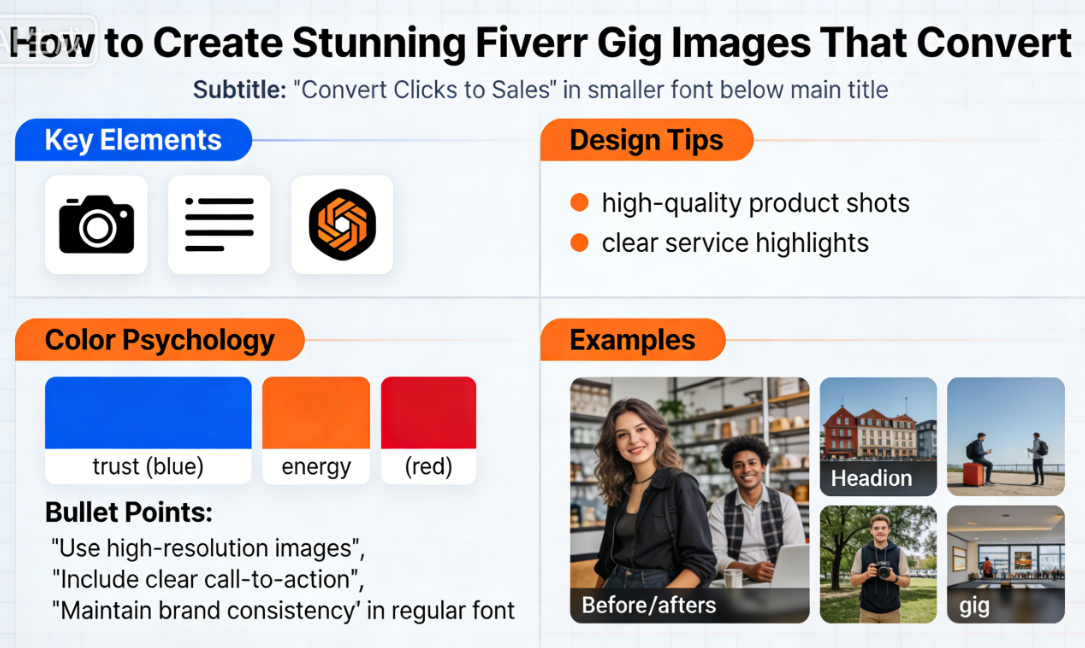
Before we dive into the “how,” let’s break down the “what.” What exactly makes a Fiverr gig image convert? After analyzing hundreds of top-performing gigs across dozens of categories, I’ve identified seven key elements that the best images share.
1. Clear, Readable Text
Your gig image needs text that communicates your service instantly. Remember, buyers are scanning quickly. Use 2-6 words maximum as your primary headline. Think “Professional Logo Design” or “I Will Edit Your Podcast.” The text should be large enough to read even as a small thumbnail on a mobile device — and considering that over 50% of Fiverr traffic is mobile, this is non-negotiable.
2. A Strong Visual Focal Point
Every high-converting image has one thing that draws the eye first. This could be a mockup of your work (like a logo on a business card), a striking photograph, or even your face. Human faces are particularly powerful — studies show they increase click-through rates by up to 38% because they build trust and personal connection.
3. Consistent Branding and Color Palette
Top sellers don’t just create random images. They use a consistent color scheme across all their gigs. This creates a professional, cohesive look when buyers visit their profile. Pick 2-3 brand colors and stick with them. Bonus: use colors that contrast with Fiverr’s white background so your images pop in search results.
4. High Contrast and Bold Colors
Muted pastels and subtle gradients look great on Dribbble, but they get lost in Fiverr’s search grid. The best-performing gig images use high-contrast color combinations — think dark backgrounds with bright text, or vibrant accent colors against neutral bases. Green, blue, and orange tend to perform particularly well on the platform.
5. Work Samples or Mockups
Show, don’t tell. If you’re a graphic designer, include a mockup of a stunning logo. If you’re a video editor, show a frame from your best work. If you’re a writer, display a beautiful book cover or article layout. Visual proof of your skills is the fastest way to build credibility before a buyer even reads your description.
6. A Clean, Uncluttered Layout
Resist the urge to cram everything onto one image. Whitespace (or “breathing room”) is your friend. The most effective gig images have a clear visual hierarchy: one main headline, one supporting visual, and maybe a small subtitle or badge. That’s it. Cluttered images scream “amateur.”
7. Trust Signals
Small details can make a big difference. Consider adding subtle trust signals like “500+ Projects Completed,” “Top Rated Seller,” “24-Hour Delivery,” or a satisfaction guarantee badge. These give buyers an extra nudge to click on your gig over a competitor’s.
🔑 Key Takeaway: The best Fiverr gig images combine clear text, a strong visual, consistent branding, high contrast, work samples, clean layout, and trust signals. You don’t need all seven in every image, but aim for at least five.
Fiverr Gig Image Specifications You Need to Know
Before you fire up your design tool, make sure you know the exact technical requirements for Fiverr gig images. Getting these wrong can result in blurry, cropped, or distorted images that scream unprofessional. Here’s the complete spec sheet for 2026:
| Specification | Requirement | Notes |
|---|---|---|
| Image Size | 1280 × 769 pixels | This is the recommended size for optimal clarity |
| Aspect Ratio | 1.6:1 | Always maintain this ratio to avoid cropping |
| File Format | JPEG, PNG | PNG is better for images with text; JPEG for photos |
| File Size Limit | 5 MB max | Compress if needed using TinyPNG or similar tools |
| Number of Images | Up to 3 | Use all 3 slots — more images = more information for buyers |
| Video | 1 optional gig video | Gigs with video get up to 40% more orders |
| 2 optional PDFs | Great for showcasing portfolios or detailed process breakdowns |
Pro tip: Always design at the full 1280 × 769 resolution, but preview your image at thumbnail size (roughly 250 × 150 pixels) to make sure everything is still legible. What looks great at full size often becomes an unreadable mess when shrunk down in search results.
For a deeper dive into optimizing every aspect of your Fiverr profile, check out our complete Fiverr guide — it covers everything from profile setup to landing your first order.
Best Free Tools to Create Professional Fiverr Gig Images
You do not need Photoshop or expensive design software to create stunning images. In fact, some of the highest-earning sellers on the platform use completely free tools. Here are the best options available in 2026:
Canva (Best Overall — Free Plan Available)
Canva is the gold standard for non-designers. It offers thousands of templates, an intuitive drag-and-drop editor, and a massive library of free stock photos, icons, and fonts. To get started, simply create a custom design at 1280 × 769 pixels and browse their templates for inspiration. The free plan is more than sufficient for creating beautiful Fiverr gig images.
Why I love it: You can create a professional-looking gig image in under 15 minutes, even if you’ve never designed anything in your life.
Figma (Best for Precision Design — Free Plan)
If you want more control over your designs, Figma is a powerful, browser-based design tool used by professional designers worldwide. It has a steeper learning curve than Canva, but the results can be exceptional. The free tier gives you up to 3 projects — more than enough for your Fiverr gigs.
Photopea (Free Photoshop Alternative)
Photopea is essentially Photoshop in your browser — completely free. It supports PSD files, layers, masks, and virtually everything Photoshop can do. If you’re comfortable with photo editing software, this is a fantastic option for creating polished gig images with advanced effects.
Adobe Express (Free Tier)
Adobe’s simplified design tool offers AI-powered features including text-to-image generation, background removal, and smart templates. The free plan includes thousands of templates and basic editing features. It’s a great middle ground between Canva’s simplicity and Figma’s power.
Quick Tool Comparison
| Tool | Ease of Use | Design Power | Best For | Price |
|---|---|---|---|---|
| Canva | ⭐⭐⭐⭐⭐ | ⭐⭐⭐ | Beginners, quick designs | Free / $12.99/mo Pro |
| Figma | ⭐⭐⭐ | ⭐⭐⭐⭐⭐ | Precision, custom layouts | Free / $12/mo Pro |
| Photopea | ⭐⭐⭐ | ⭐⭐⭐⭐⭐ | Photo editing, PSD files | Free (ad-supported) |
| Adobe Express | ⭐⭐⭐⭐ | ⭐⭐⭐⭐ | AI features, templates | Free / $9.99/mo Premium |
Step-by-Step: Creating Your First High-Converting Fiverr Gig Image
Alright, let’s get practical. I’m going to walk you through the exact process I use to create Fiverr gig images that consistently drive clicks and conversions. I’ll use Canva for this tutorial since it’s the most accessible, but the principles apply to any tool.
Step 1: Research Your Competition (10 Minutes)
Before you design anything, go to Fiverr and search for your service category. Study the top 20 gigs on the first page. Ask yourself:
- What colors are most common? (You’ll want to stand out from these)
- What text are sellers using on their images?
- Which images catch your eye first, and why?
- What are the worst images doing wrong?
Take screenshots of 5-10 images you admire. These aren’t for copying — they’re for inspiration and understanding what works in your niche.
Step 2: Choose Your Color Scheme (5 Minutes)
Based on your research, pick 2-3 colors that will make your image stand out while still looking professional. If most competitors use blue, maybe go with a warm orange or bold green. Use a tool like Coolors.co to generate complementary color palettes.
A simple formula that works: one dark background color + one bright accent color + white text. This combination provides high contrast and excellent readability at any size.
Step 3: Write Your Image Copy (5 Minutes)
Decide on your text before you start designing. You need:
- A primary headline (2-6 words): “Professional Logo Design”
- A supporting subtitle (optional, 3-8 words): “Modern, Minimalist & Unique”
- A trust badge (optional, 2-4 words): “500+ Happy Clients”
Keep it simple. Your image text should communicate what you do and why you’re the one to do it — nothing more.
Step 4: Set Up Your Canvas (2 Minutes)
Open Canva and create a custom size design at 1280 × 769 pixels. Start with either a blank canvas or browse templates for inspiration. If you use a template, customize it heavily — you don’t want your image to look identical to another seller’s.
Step 5: Build Your Layout (15-20 Minutes)
Follow this layout framework that works across virtually every Fiverr category:
- Set your background color or image
- Place your primary headline in large, bold font (aim for 40-60pt equivalent)
- Add your visual focal point — a mockup, portfolio sample, or professional photo
- Include your subtitle and trust badges in smaller text
- Add a subtle border or frame to make your image pop against Fiverr’s white background
💡 Pro Tip: Use the “rule of thirds” for placement. Divide your image into a 3×3 grid and place your most important elements along the intersection points. This creates a naturally pleasing, professional composition that draws the eye exactly where you want it.
Step 6: Test at Thumbnail Size (3 Minutes)
This is the step most sellers skip — and it’s arguably the most important. Zoom out to 25-30% in your design tool. Can you still read the text? Can you still tell what the image is about? If not, go back and simplify. Increase font sizes, reduce clutter, and boost contrast until everything is crystal clear at small sizes.
Step 7: Export and Upload (2 Minutes)
Export your image as a PNG file for best quality (especially if it contains text). Upload it to your Fiverr gig, and don’t forget to fill all three image slots. Your first image is your thumbnail — make it your strongest. Use the second and third slots for additional work samples, process breakdowns, or package comparisons.
🚀 Ready to Put These Tips Into Action?
Creating stunning gig images is only half the battle — you need a gig to put them on! If you haven’t already set up your seller profile, now is the perfect time. Fiverr is free to join, and you could have your first gig live within the hour.
Sign up for Fiverr here and start building your freelance income today. Thousands of buyers are searching for your skills right now — don’t make them wait.
10 Deadly Fiverr Gig Image Mistakes (And How to Fix Them)
Now that you know what to do, let’s talk about what not to do. I see these mistakes constantly — even from sellers who have been on the platform for years. Avoiding these pitfalls alone can put you ahead of 80% of your competition.
Mistake #1: Using Stock Photos Without Customization
Slapping a generic stock photo on your gig makes you invisible. If five other sellers are using the same image of a smiling person at a laptop, buyers can’t tell you apart. Fix: Always add custom text, overlays, branding, or mockups on top of any stock imagery.
Mistake #2: Tiny, Unreadable Text
If buyers need to squint to read your gig image, they won’t bother. Fix: Use a minimum 36pt font for your headline and always test at thumbnail size before uploading.
Mistake #3: Low-Resolution or Blurry Images
Blurry images signal low quality — even if your actual work is exceptional. Fix: Always design at 1280 × 769 pixels and export in PNG format for sharp text rendering.
Mistake #4: Too Many Colors and Fonts
Using five different fonts and a rainbow of colors creates visual chaos. Fix: Stick to a maximum of 2 fonts and 3 colors. Less is always more in design.
Mistake #5: No Text or Context
Some sellers upload beautiful images with zero text, leaving buyers confused about what the gig actually offers. Fix: Always include a clear headline describing your service.
Mistake #6: Ignoring Mobile Users
Over 50% of Fiverr buyers browse on mobile devices, where gig images appear much smaller. Fix: Preview your designs at reduced sizes and prioritize readability over decoration.
Mistake #7: Inconsistent Branding Across Gigs
When your gig images look like they were made by different people, it hurts your professional image. Fix: Create a template with consistent colors, fonts, and layout, then adapt it for each gig.
Mistake #8: Misleading Images
Showing work that isn’t yours — or that overpromises what you can deliver — leads to disappointed clients, bad reviews, and account warnings. Fix: Only showcase your own work or clearly labeled mockups.
Mistake #9: Forgetting the Second and Third Image Slots
Many sellers only upload one image. That’s leaving money on the table. Fix: Use all three slots. Show different angles, packages, or testimonials in your additional images.
Mistake #10: Never Testing or Updating
Your first image design probably won’t be your best. Fix: A/B test different images every few weeks. Track your click-through rate in Fiverr Analytics and double down on what works.
For more Fiverr tips and strategies to boost your freelance income, explore our freelancing resources covering everything from pricing strategies to client management.
Advanced Strategies: Taking Your Fiverr Gig Images to the Next Level
Once you’ve nailed the basics, these advanced techniques can help you squeeze even more conversions out of your images. These are the strategies that separate $100/month sellers from $3,000/month sellers.
Use Before-and-After Images
If your service involves any kind of transformation — photo editing, resume writing, website redesign — a split-screen before-and-after image is incredibly powerful. It shows the value of your work instantly, without buyers needing to read a single word. I’ve seen sellers double their click-through rates simply by switching to this format.
Add Subtle Animation With Gig Videos
While not technically a static image, your gig video plays as a GIF-style preview in search results on desktop. Fiverr reports that gigs with video earn up to 40% more revenue than those without. Even a simple 30-second slideshow of your best work, with background music and text overlays, can dramatically boost your visibility.
Create Package-Specific Images
Use your second and third image slots to create visual breakdowns of your packages. Show a side-by-side comparison of your Basic, Standard, and Premium tiers with clear icons and pricing. This helps buyers self-select the right package before they even click, resulting in faster decisions and fewer tire-kickers.
Leverage Social Proof Directly on Your Image
Include a real review snippet, a star rating, or the number of completed orders right on your gig image. Something like “⭐ 5.0 | 1,200+ Orders” in a small badge instantly builds trust. Just make sure the numbers are accurate and up to date.
Use Seasonal and Trending Updates
Smart sellers update their gig images for key seasons — think holiday-themed borders in December or “New Year, New Brand” messaging in January. This signals to buyers that you’re active, current, and attentive. It also gives the algorithm a reason to re-evaluate your gig’s performance.
Want to learn even more strategies for standing out on the platform? Check out more Fiverr tips in our comprehensive resource hub.
Fiverr Gig Image Templates: Category-Specific Frameworks
Different Fiverr categories require different image approaches. Here’s a quick framework for some of the most popular service categories to help you get started on Fiverr with the right visual strategy:
| Category | Best Image Approach | Must-Include Elements |
|---|---|---|
| Logo Design | Mockup of logo on business card or signage | 3D mockup, clean background, “Logo Design” text |
| Web Development | Laptop/phone mockup showing a website | Device mockup, tech-style fonts, key features listed |
| Content Writing | Clean text-based design with article preview | Word count or turnaround time badge, sample text |
| Video Editing | Video frame screenshot with play button overlay | Before/after, timeline visual, software icons |
| Virtual Assistant | Professional photo with task icons around it | Your face, list of services, availability hours |
| SEO Services | Graph showing upward trend with analytics dashboard | Growth metrics, tool logos, results-focused text |
| Voiceover | Microphone photo with sound wave graphics | Your face, microphone, language flags, sample genres |
Real Numbers: How Image Optimization Impacted My Fiverr Earnings
I don’t want you to just take my word for it. Let me share some actual results from my own Fiverr journey and from sellers I’ve mentored.
When I launched my first writing gig in early 2021, I used a plain white image with black text that said “I Will Write Blog Posts For You.” Groundbreaking, right? In the first 30 days, I got 127 impressions, 8 clicks, and 0 orders. That’s a 6.3% click-through rate and a whopping 0% conversion rate.
After redesigning my gig image — adding a dark blue gradient background, a mockup of a blog post on a laptop screen, a bold headline in white, and a “100% Original Content” badge — the results changed dramatically. Over the next 30 days: 340 impressions, 52 clicks, and 7 orders totaling $245. Same gig description. Same pricing. Same portfolio. The only thing that changed was the image.
I’ve since helped over 40 Fiverr sellers redesign their gig images, and the average improvement in click-through rate has been 185%. One seller in the WordPress development niche went from $300/month to over $1,800/month within 60 days — and image optimization was the biggest single change they made.
Imagine waking up tomorrow to find three new order notifications on your phone, totaling $500. That could be your reality a month from now. It all starts with that thumbnail.
🔑 Key Takeaway: Optimized Fiverr gig images aren’t a “nice-to-have” — they’re a revenue multiplier. Even small improvements in click-through rate compound over time as Fiverr’s algorithm rewards higher engagement with more visibility.
How Often Should You Update Your Fiverr Gig Images?
Here’s a question I get asked constantly: “Once I create a great image, can I just set it and forget it?” The short answer is no. The longer answer? It depends on your data.
I recommend reviewing your Fiverr Analytics dashboard every two weeks. Pay attention to these metrics:
- Impressions: How often your gig appears in search results
- Clicks: How many people click on your gig
- Click-Through Rate (CTR): Clicks ÷ Impressions — this is the metric most directly influenced by your image
- Orders: The ultimate measure of conversion
If your CTR drops below 5%, it’s time to refresh your image. Even if things are going well, I suggest testing a new image variation every 6-8 weeks to see if you can improve further. Keep the old design saved so you can revert if the new one underperforms.
Seasonal updates are also a smart play. Updating your images during peak buying seasons (January, September, and the holiday season) signals to both buyers and the algorithm that your gig is active and relevant.
To stay on top of all these optimization strategies, check out our Fiverr resource hub for regularly updated tips and guides tailored to Fiverr for beginners and experienced sellers alike.
Putting It All Together: Your Fiverr Gig Image Checklist
Before you upload any image to your Fiverr gig, run through this checklist. Print it out, bookmark this page — whatever helps you remember. Every single image you create should pass all of these checks:
- ✅ Dimensions are correct — 1280 × 769 pixels
- ✅ Text is readable at thumbnail size — test at 25% zoom
- ✅ Clear headline communicating your service in 2-6 words
- ✅ High contrast between text and background
- ✅ Visual focal point — mockup, portfolio sample, or professional photo
- ✅ Maximum 2 fonts and 3 colors used
- ✅ Consistent branding across all your gigs
- ✅ At least one trust signal — review count, completion badge, or guarantee
- ✅ No blurry, pixelated, or low-quality elements
- ✅ All 3 image slots filled with purposeful content
- ✅ File exported as PNG under 5 MB
- ✅ Looks distinctly different from top competitors’ images
If you check every box, you’re in excellent shape. If not, go back and refine. The 20 extra minutes you spend on your gig image today could mean hundreds of extra dollars in orders over the next few months.
Frequently Asked Questions About Fiverr Gig Images
What is the best size for Fiverr gig images in 2026?
The recommended size for Fiverr gig images is 1280 × 769 pixels with a 1.6:1 aspect ratio. This ensures your image looks sharp on both desktop and mobile devices. Always export as a PNG file for the best text clarity, and keep the file size under 5 MB.
Can I use Canva to create Fiverr gig images for free?
Absolutely! Canva’s free plan is more than sufficient for creating professional Fiverr gig images. Set up a custom canvas at 1280 × 769 pixels, choose from thousands of free templates, and customize with your own text, colors, and images. Most top sellers use Canva or similar free tools.
How many images should I upload to my Fiverr gig?
Fiverr allows you to upload up to 3 images per gig, and you should use all three. Your first image is your thumbnail in search results — make it your strongest. Use the remaining slots for work samples, package comparisons, or process overviews. Gigs with all image slots filled tend to convert better.
Do Fiverr gig images affect search ranking?
Indirectly, yes. While Fiverr’s algorithm doesn’t directly analyze your image quality, it heavily weighs click-through rate (CTR) as a ranking factor. Better images lead to higher CTR, which signals to the algorithm that your gig is relevant and engaging, resulting in higher search placement and more visibility.
Should I include my face on my Fiverr gig image?
In many categories, yes. Images with human faces tend to increase click-through rates by up to 38% because they build trust and personal connection. This is especially effective for service categories like virtual assistance, consulting, voiceover, and teaching. However, for design-heavy categories like logo or web design, a strong portfolio mockup may perform better.
How often should I change my Fiverr gig images?
Review your gig performance every 2 weeks and consider refreshing your images every 6-8 weeks, or sooner if your click-through rate drops below 5%. Seasonal updates during peak buying periods (January, September, holidays) can also boost engagement. Always save old designs so you can revert if needed.
Conclusion: Your Fiverr Gig Images Are Your #1 Sales Tool
Let’s bring it all together. Your Fiverr gig images are not just decoration — they’re the single most impactful factor in whether a buyer clicks on your gig or scrolls past it. In a marketplace with hundreds of thousands of sellers, your image is your competitive edge.
Here’s what you’ve learned today:
- First impressions are everything — buyers decide in 3 seconds or less, and your image drives that decision
- Seven key elements make up a high-converting gig image: clear text, strong visuals, consistent branding, high contrast, work samples, clean layout, and trust signals
- Free tools like Canva are all you need to create professional, stunning images — no design experience required
- Avoid the 10 deadly mistakes that most sellers make, from tiny text to ignoring mobile users
- Regularly test and update your images using Fiverr Analytics to continuously improve your click-through rate and earnings
The difference between a struggling Fiverr seller and one earning a consistent $1,000-$3,000+ per month often comes down to details exactly like this. Your skills are already valuable. Your prices might already be competitive. But if your gig image isn’t doing its job, buyers will never discover what you have to offer.
So here’s my challenge to you: take action today. Not tomorrow. Not next week. Today. Open Canva, set up a 1280 × 769 canvas, and spend 30 minutes creating the best gig image you possibly can. Then upload it. Then watch what happens to your analytics over the next two weeks.
You might just be surprised at how quickly things change.
🎯 Start Your Fiverr Journey Today
Whether you’re creating your first gig or optimizing your tenth, it all starts with being on the platform. Join Fiverr today — it’s completely free to sign up and create your seller profile. Apply everything you’ve learned in this guide, and you could be earning your first freelance income this week.
Already on Fiverr? Go update those gig images right now. Your future clients are searching for you as we speak. Don’t let a mediocre thumbnail be the reason they never find you.
For even more tips, strategies, and step-by-step tutorials, explore our complete Fiverr resource hub and take your freelance career to the next level.



Leave a Reply