



How to Start a Fiverr Video Editing Business From Scratch and Earn $1,000+/Month [2026 Guide]
Here’s a number that might surprise you: the global video editing services market is projected to surpass $4.6 billion by 2027, and a massive chunk of that work is being done by freelancers on platforms like Fiverr. If you’ve ever thought about turning your video editing skills into real income, you’re looking at one of the best opportunities in the freelance economy right now.
But let’s be honest — getting started with Fiverr video editing can feel overwhelming. You might be wondering: How do I set up my gig? What should I charge? How do I compete with thousands of other editors? I’ve been there. When I first started freelancing on Fiverr, I made every mistake in the book — bad thumbnails, confusing descriptions, prices that were either too low or too high.
That’s exactly why I wrote this guide. Whether you’re a complete beginner who just learned Premiere Pro last month or an intermediate editor looking to build a consistent freelance income, I’m going to walk you through the entire process step by step. You’ll learn how to create gigs that actually get clicks, price your services strategically, land your first clients, and scale to $1,000 or more per month. Let’s dive in.
Why Fiverr Video Editing Is One of the Best Online Side Hustles in 2026
Before we get into the how-to, let’s talk about why video editing on Fiverr is such a smart move right now. It’s not just hype — the numbers back it up.
Video content is absolutely everywhere. YouTube creators upload over 500 hours of video every single minute. TikTok, Instagram Reels, LinkedIn videos, podcast clips, online courses — businesses and creators are drowning in content that needs to be edited. Most of them don’t have the time, skills, or desire to do it themselves.
That’s where you come in.
Here’s what makes Fiverr specifically such a great platform for video editors:
- No cold pitching required — Buyers come to YOU through Fiverr’s search engine
- Built-in trust system — Reviews and ratings help you build credibility fast
- Global marketplace — Access clients from over 160 countries, 24/7
- Low barrier to entry — You can create your free Fiverr account and have a gig live within an hour
- Scalable income — Top Fiverr video editors earn $5,000–$15,000/month
The demand for video editing services on Fiverr has grown by over 40% year-over-year since 2023. Whether you see this as a side hustle or a full-time career path, the timing couldn’t be better.
If you want a broader look at how Fiverr works and what other opportunities exist, check out our complete Fiverr guide for the full breakdown.
What You Need Before You Start Your Fiverr Video Editing Gigs
Skills: You Don’t Need to Be a Pro (Yet)
Here’s the truth that most people won’t tell you: you don’t need to be an expert editor to start earning on Fiverr. You need to be competent enough to deliver clean, professional work — and that’s a much lower bar than you think.
At a minimum, you should be comfortable with:
- Basic cutting, trimming, and arranging clips on a timeline
- Adding text overlays, transitions, and simple motion graphics
- Color correction (even basic auto-correct counts)
- Audio syncing, noise reduction, and volume leveling
- Exporting in the correct formats for different platforms (YouTube, TikTok, etc.)
If you can do these things, you’re ready. You’ll sharpen your skills with every project — I promise.
Software and Equipment
You don’t need a $3,000 setup. Here’s what actually matters:
| Item | Budget Option | Professional Option | Estimated Cost |
|---|---|---|---|
| Editing Software | DaVinci Resolve (Free) | Adobe Premiere Pro ($22.99/mo) | $0 – $276/year |
| Computer | Any laptop with 8GB RAM + SSD | Desktop with 16GB+ RAM, dedicated GPU | $400 – $1,500+ |
| Storage | 1TB External HDD | 2TB+ External SSD + Cloud Backup | $50 – $200 |
| Internet | 25 Mbps upload speed | 100+ Mbps upload speed | Varies by location |
| Headphones | Any decent over-ear headphones | Audio-Technica ATH-M50x or similar | $20 – $150 |
My recommendation for beginners: Start with DaVinci Resolve. It’s completely free, insanely powerful, and used by professional Hollywood editors. There’s zero reason to pay for software until you’re consistently earning.
A Simple Portfolio (Even With No Clients)
This is where most beginners get stuck. “But I don’t have any client work to show!” I hear you. Here’s what you do instead:
- Edit free stock footage — Download clips from Pexels or Pixabay and create a polished 60-second montage
- Re-edit existing YouTube videos — Take a popular creator’s raw-feeling video and make it snappier (for practice/portfolio only, not for commercial use)
- Create before-and-after demos — Show raw footage next to your edited version in a split-screen
- Edit for friends or local businesses for free — One or two projects is enough to get started
You only need 2–3 solid samples to launch your first gig. Don’t let perfectionism hold you back.
Step-by-Step: Setting Up Your Fiverr Video Editing Gig
Alright, this is where the rubber meets the road. Let me walk you through setting up a gig that actually gets found, clicked, and ordered. These are the exact Fiverr tips that took me from zero to consistent orders.
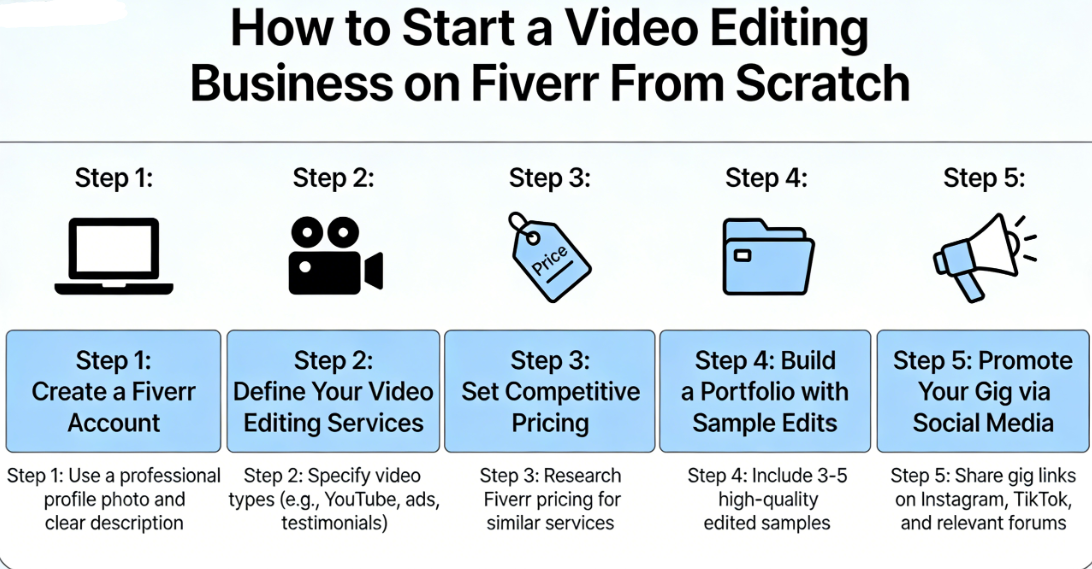
Step 1: Create and Optimize Your Fiverr Profile
First things first — sign up for Fiverr here if you haven’t already. It’s free and takes about 5 minutes.
Now, your profile is your first impression. Here’s how to make it count:
- Profile photo: Use a clear, friendly, well-lit headshot. Profiles with professional photos get up to 70% more engagement.
- Display name: Use your real name or a professional-sounding brand name. Avoid “xXVideoKing99Xx.”
- Professional headline: Be specific. Instead of “I edit videos,” try: “Professional Video Editor | YouTube, Reels, TikTok & Podcasts”
- Description: Write 2–3 short paragraphs explaining who you are, what you specialize in, your software expertise, and your turnaround time. Speak directly to the client’s needs.
- Skills tags: Add relevant skills like “Video Editing,” “Adobe Premiere Pro,” “Color Grading,” “YouTube Editing,” “Short-Form Content,” etc.
💡 Pro Tip: Your profile description should focus on the client’s problems, not just your skills. Instead of “I know Premiere Pro and After Effects,” try: “I help YouTubers and businesses create scroll-stopping videos that grow their audience — without spending hours in the editing chair.”
Step 2: Craft a Gig Title That Ranks in Fiverr Search
Your gig title is basically your SEO headline on Fiverr. The algorithm uses it to decide when to show your gig in search results. Here’s the formula:
“I will” + [specific service] + “for” + [specific audience/platform]
Examples:
- “I will professionally edit your YouTube videos with engaging cuts and effects”
- “I will edit short-form videos for TikTok, Reels, and YouTube Shorts”
- “I will do cinematic video editing for your business or brand”
Avoid vague titles like “I will edit your video.” That tells the algorithm nothing and gives buyers no reason to click.
Step 3: Write a Gig Description That Converts
Your gig description needs to do three things: build trust, explain your service clearly, and overcome objections. Here’s a proven structure:
- Hook (2–3 sentences): Address the buyer’s pain point. “Tired of spending hours editing your YouTube videos? Let me handle it so you can focus on creating content.”
- What’s included (bullet list): Spell out exactly what they get — cuts/transitions, color grading, text overlays, music, sound design, etc.
- Why choose you (2–3 sentences): Mention your experience, turnaround time, and software.
- Call to action: “Message me before ordering so we can discuss your project and make sure I’m the right fit!”
Use all five available tags in your gig metadata and select the most relevant category (usually “Video & Animation > Video Editing”).
Step 4: Design a Gig Image and Video That Stands Out
This is critical — and it’s where most beginners blow it. Your gig thumbnail is the single biggest factor in whether someone clicks on your gig or scrolls past it.
- Use bold, clean text that describes your service (e.g., “Professional YouTube Video Editing”)
- Show a before/after screenshot of your editing work
- Use contrasting colors — bright text on a dark background works great
- Add a gig video — Gigs with videos get up to 220% more orders according to Fiverr’s own data
Your gig video should be 30–75 seconds: introduce yourself, show samples of your work, and explain what makes you different. Keep it energetic and professional.
Step 5: Set Up Your Pricing Packages Strategically
Fiverr lets you create three pricing tiers: Basic, Standard, and Premium. This is where you can really maximize your earnings. Here’s a pricing framework for Fiverr video editing beginners:
| Package | What’s Included | Suggested Starting Price |
|---|---|---|
| Basic | Simple cuts, transitions, and text for a video up to 5 min | $25 – $50 |
| Standard | Everything in Basic + color correction, background music, sound effects, up to 15 min | $75 – $150 |
| Premium | Full production edit — motion graphics, thumbnails, multi-cam, up to 30 min | $200 – $400 |
Important: Don’t start at $5 just to get orders. Seriously. Ultra-low pricing attracts nightmare clients and signals low quality. Starting at $25–$50 for your Basic package positions you as a professional, even if you’re brand new.
Also, add gig extras like expedited delivery (+$20), extra revisions (+$10), or raw file delivery (+$15). These add up fast. Some months, my gig extras accounted for 30% of my total freelance income.
🚀 Ready to Launch Your Video Editing Business?
The best time to start was yesterday. The second best time is right now. Setting up your Fiverr account is completely free, and you could have your first gig live within the hour.
Thousands of buyers are searching for video editors on Fiverr right now. The only question is whether they’ll find you.
How to Get Your First Fiverr Video Editing Orders (Even With Zero Reviews)
Let’s address the elephant in the room: the dreaded zero-review problem. Every seller starts here, and yes, it’s the hardest phase. But it’s absolutely beatable. Here are the strategies that actually work — no shortcuts, no shady tactics.
Leverage Fiverr’s Buyer Requests
Fiverr has a feature where buyers post what they need, and sellers can send offers. Check this section multiple times per day. When you respond:
- Be specific about how you’ll solve their problem
- Reference their project details (don’t send generic copy-paste messages)
- Offer a slightly competitive price for your first few orders
- Keep it short — 3–4 sentences max
Share Your Gig Outside of Fiverr
Don’t just sit and wait. Promote your Fiverr gigs on:
- Reddit — Subreddits like r/YouTubers, r/SmallYTChannel, r/videography, and r/slavelabour (yes, that’s a real subreddit for cheap freelance gigs)
- Facebook Groups — Search for “YouTube creators,” “content creators,” or “video editing services”
- Twitter/X — Share portfolio clips with relevant hashtags
- LinkedIn — Connect with marketing managers and social media managers who might need regular editing
The goal isn’t to get thousands of followers — it’s to get 3–5 orders and reviews. Once you hit that number, Fiverr’s algorithm starts working in your favor.
Offer “Launch Pricing” Strategically
For your very first 3–5 clients, consider offering a 10–20% discount in exchange for honest reviews. Don’t undervalue your work drastically, but a small incentive can break the ice. Once you have a handful of five-star reviews, raise your prices confidently.
Real talk: My first Fiverr video editing order was a 10-minute YouTube video for $30. It took me way too long, and I probably earned about $4/hour. But that one review opened the floodgates. Within 60 days, I had 15 reviews and was charging $150+ per video. The initial grind is worth it.
For more strategies on getting your first sales and navigating the platform, check out more Fiverr tips on our main resource page.
Scaling Your Fiverr Video Editing Business to $1,000+/Month
Getting your first few orders feels amazing. But how do you go from sporadic $30 gigs to a consistent $1,000+ per month? Here’s the roadmap that works for Fiverr for beginners ready to level up.
Niche Down for Higher Rates
This is the single biggest lever you can pull. Specialized editors earn 2–5x more than generalists. Instead of “I edit any video,” become THE person for a specific type of editing:
- YouTube long-form content (tutorials, vlogs, commentary)
- Short-form viral content (TikTok, Reels, Shorts)
- Real estate videos
- Wedding and event highlights
- Podcast video editing (huge and growing market)
- Course and educational content
- Gaming/esports content
When you niche down, you can charge premium prices because you understand the specific audience’s needs, trends, and style expectations. A “YouTube editor” who understands retention editing, pattern interrupts, and thumbnail strategy is worth far more than a generic video editor.
Create Multiple Gigs
Don’t put all your eggs in one gig. Fiverr allows you to have up to 7 active gigs (more as you level up). Create separate gigs for:
- YouTube video editing
- Short-form/TikTok editing
- Podcast video editing
- Video color grading
- Motion graphics/intros/outros
Each gig targets different search terms, which means more visibility and more chances to get discovered. Think of each gig as a separate storefront in a digital mall.
Focus on Repeat Clients
Here’s a secret that changed everything for me: 80% of my income comes from about 20% of my clients. These are YouTubers, agencies, and businesses that need videos edited every single week.
To build repeat business:
- Over-deliver on the first order — Add a small bonus they didn’t expect (a free thumbnail, an extra revision, a compliment about their content)
- Communicate proactively — Send updates before they ask
- Offer subscription-style packages — “4 videos per month for $X” keeps them committed
- Be reliable — Deliver on time, every time. This alone puts you in the top 10% of freelancers
One recurring client who orders 4 videos per month at $150 each = $600/month from a single person. Land two of those clients, and you’ve already crushed the $1,000 mark.
The Income Math: How $1,000/Month Actually Looks
| Scenario | Orders/Month | Avg. Price per Order | Monthly Revenue | After Fiverr’s 20% Fee |
|---|---|---|---|---|
| Beginner (Month 1–2) | 5 | $40 | $200 | $160 |
| Growing (Month 3–5) | 12 | $75 | $900 | $720 |
| Established (Month 6+) | 15 | $120 | $1,800 | $1,440 |
| Top Seller | 25+ | $200+ | $5,000+ | $4,000+ |
Notice how the jump from beginner to established isn’t about working 10x harder — it’s about raising your prices and attracting better clients. That’s the real game.
💰 Key Takeaway: Don’t chase more orders — chase higher-value orders. It’s easier (and less exhausting) to complete 15 orders at $120 than 60 orders at $30. Quality over quantity, always.
Essential Fiverr Tips for Video Editors: What the Top Sellers Do Differently
I’ve studied dozens of top-rated Fiverr video editors, and the patterns are remarkably consistent. Here’s what separates the sellers earning $500/month from those pulling in $5,000+:
1. They Respond Insanely Fast
Fiverr tracks your response time, and it affects your search ranking. Top sellers respond to messages within 1 hour or less. Set up the Fiverr app on your phone with notifications turned on. A fast response often wins the job over a better portfolio with a slow reply.
2. They Use “Retention Editing” Keywords
In 2026, YouTube creators are obsessed with retention editing — the fast-paced, meme-heavy, zoom-and-cut style that keeps viewers watching. If you can offer this, mention it explicitly in your gig title and description. It’s one of the most searched terms in the video editing category.
3. They Continuously Update Their Portfolio
Every 2–4 weeks, swap out your gig samples with your latest and best work. Fresh content signals to both buyers and the algorithm that you’re active and improving.
4. They Master the Art of Upselling
When a client orders a Basic package, the best sellers find natural ways to suggest upgrades: “I noticed your footage could really benefit from color grading — would you like me to add that for $20?” This isn’t pushy — it’s helpful, and it can easily add 30–50% to your average order value.
5. They Build Relationships Outside Orders
A quick follow-up message a week after delivery — “Hey! How did the video perform? Happy to make any tweaks if needed” — goes a long way. It shows you care, and it often triggers reorders.
Want to dive deeper into platform strategies? Explore our freelancing resources for more in-depth guides.
Common Mistakes to Avoid as a New Fiverr Video Editor
I’ve made most of these mistakes myself, so learn from my pain:
- Pricing at $5 to “get started” — This attracts terrible clients, devalues your work, and makes it harder to raise prices later. Start at $25 minimum.
- Offering unlimited revisions — This is a trap. Offer 1–2 revisions in Basic, 3 in Standard, and 5 in Premium. Unlimited = unlimited headaches.
- Not communicating before starting — Always message the buyer to confirm expectations, file formats, and deadlines before you touch the timeline.
- Ignoring gig SEO — Your gig title, tags, and description are how Fiverr’s algorithm finds you. Treat them like you’d treat Google SEO.
- Burning out by saying yes to everything — It’s okay to decline projects that aren’t a good fit. Your time and mental health matter more than one extra order.
- Not delivering on time — Late deliveries destroy your ranking. If you need more time, extend the delivery date before it expires.
Pro Tip: Set your delivery time to slightly longer than you actually need. If you can finish a project in 3 days, set the delivery to 4. Early delivery = happy client + better metrics. Late delivery = disaster.
Tools and Resources to Level Up Your Fiverr Video Editing Game
Beyond your main editing software, these tools can save you hours and make your work look significantly more professional:
- Artlist or Epidemic Sound — Royalty-free music libraries ($16.60/mo). Clients love when you add the perfect background track.
- Canva — For creating gig thumbnails, YouTube thumbnails for clients, and social media graphics (free tier works great).
- Frame.io or Google Drive — For receiving and delivering large video files. Smoother than Fiverr’s built-in file transfer for big projects.
- Motion Array or Envato Elements — Templates, presets, transitions, and motion graphics that make your edits look expensive.
- AutoPod (for Premiere Pro) — Automates multi-cam podcast editing. If you niche into podcast editing, this is a game-changer.
- CapCut — Surprisingly powerful free editor for quick short-form content. Some sellers use it alongside their main NLE.
Investing $20–$50/month in tools can easily add hundreds of dollars in value to your services. Think of it as a business expense, not a personal expense.
Real Income Examples: What Fiverr Video Editors Actually Earn
Let me paint a realistic picture so you know what to expect. These are based on real seller profiles and publicly available data from Fiverr:
- Brand new seller (0–10 reviews): $100–$400/month — You’re still building credibility and learning the platform.
- Level 1 seller (10–50 reviews): $500–$1,500/month — Orders start becoming more consistent. You’re raising prices.
- Level 2 seller (50–200 reviews): $1,500–$5,000/month — Repeat clients, premium pricing, multiple gigs firing.
- Top Rated Seller (200+ reviews): $5,000–$15,000+/month — You’re a Fiverr veteran with a waiting list.
Imagine waking up on a random Tuesday morning, checking your phone, and seeing $350 in new Fiverr orders overnight — from clients in different time zones who found your gig while you were sleeping. That’s the beauty of this platform. It works for you 24/7.
The timeline to Level 1 is typically 60–90 days if you’re actively promoting your gigs and delivering great work. It’s not overnight money, but it builds faster than most people expect.
💼 Your Fiverr Video Editing Business Starts Here
Every successful Fiverr seller started exactly where you are right now — reading, learning, and deciding to take action. The difference between those who earn $1,000+/month and those who never start? They actually created their gig.
Join Fiverr today and create your first video editing gig →
It’s free to sign up. It’s free to list your gig. The only investment is your time and talent — and you’ve already got both.
Frequently Asked Questions About Fiverr Video Editing
How much can you realistically make doing video editing on Fiverr?
Most beginner Fiverr video editors earn $200–$500 in their first month with consistent effort. Within 3–6 months, many reach $1,000–$2,000/month by raising prices and securing repeat clients. Top-rated sellers with established reputations can earn $5,000–$15,000+ per month. Your income depends on your niche, pricing strategy, and how well you optimize your gigs.
Do I need professional video editing experience to start on Fiverr?
No. You don’t need a degree, certification, or years of experience. If you can competently use editing software like DaVinci Resolve, Premiere Pro, or Final Cut Pro, and you can deliver clean, professional-looking edits, you’re qualified to start. Many successful Fiverr editors are self-taught through YouTube tutorials. Focus on building a small portfolio of 2–3 sample edits, then check out Fiverr and launch your first gig.
What software do most Fiverr video editors use?
Adobe Premiere Pro is the most popular choice due to its industry-standard status and integration with After Effects. However, DaVinci Resolve (free version) is an excellent alternative that many successful sellers use. Final Cut Pro is popular among Mac users. For short-form content, some editors also use CapCut. The software matters less than the quality of your output.
How long does it take to get your first order on Fiverr?
With an optimized gig and active promotion, most new sellers get their first order within 1–3 weeks. Some get lucky within days. The key factors are: gig SEO optimization, an eye-catching thumbnail, competitive (but not bottom-barrel) pricing, and actively responding to buyer requests. Sharing your gig on social media can significantly accelerate this timeline.
Does Fiverr take a commission on video editing earnings?
Yes. Fiverr takes a 20% commission on all orders. So if a client pays $100, you receive $80. While this might seem high, remember that Fiverr handles marketing, payment processing, dispute resolution, and brings buyers directly to you — things that would cost you far more to do independently. Factor the fee into your pricing from the start.
Can I do Fiverr video editing as a part-time side hustle?
Absolutely — in fact, that’s how most people start. Many successful sellers work 10–15 hours per week on Fiverr alongside a full-time job or school. The key is setting realistic delivery times (3–5 days instead of 24 hours) and being upfront in your gig about your availability. As your income grows, you can decide whether to go full-time or keep it as supplemental freelance income.
Conclusion: Your Fiverr Video Editing Journey Starts Now
Let’s bring it all together. Starting a Fiverr video editing business from scratch isn’t complicated — but it does require action, patience, and a willingness to improve with every project. Here are your key takeaways:
- The demand for video editors is massive and growing — Creators, businesses, and brands need your skills right now
- You don’t need expensive gear or years of experience — Free software, a decent computer, and 2–3 portfolio samples are enough to start
- Gig optimization is everything — Your title, thumbnail, description, and pricing determine whether you get found and hired
- The first 5–10 orders are the hardest — Push through the initial grind with smart promotion and competitive (not cheap) pricing
- $1,000+/month is achievable within 3–6 months — Niche down, raise your prices as reviews come in, and focus on repeat clients
I want you to do something right now — not tomorrow, not next week, now. Open a new tab, sign up for Fiverr here, and start creating your first gig. It doesn’t need to be perfect. It needs to exist.
Six months from now, you could be waking up to order notifications, building a client roster, and earning real money doing something you enjoy — all from your laptop. Or six months from now, you could still be thinking about it.
The choice is yours. Go make it happen. 🎬
For more strategies, platform guides, and freelancing advice, explore our full Fiverr resource hub.



Leave a Reply